On The Glideslope

  • How To
    • How I Configure For VR In X-Plane
    • How To Have Dual Controls In X-Plane
    • How To Configure X-Plane 11 For Multiple Screens
    • How To Create Custom Cameras In P3D
    • How To Get Started With X-Plane 11
  • Resources
    • Schematics
    • Center Console Plans
    • Basement Sim Video Tour
    • Screen Configurations
    • A2A LVAR List PDFs
    • How To Talk ATC
    • Cessna 172 Cabin Dimensions
    • USB u0026 Saitek
  • Reviews
  • What’s In The Sim
  • About OTG
    • About OTG
    • The Construction Journey
  • Reader Mail

    2016-09-09

    |

    Configuration, Reader Mail

    I recently had this exchange with a reader and thought it might be worth posting.

    I have a question regarding your setup.

    I have upgraded my pc to exactly your specifications (6770k 4 gh -> overclocked to 4,6; 16GB DDR4 3000, NVidiaa GTX 980TI) with 3 monitors (all 3 with nvidia surround connected together to get 3x full hd).
    The good thing: when I am at ORBX pacific NW scenery with normal airports (Concret Mun eg) i get 30 fps with a view configuration like yours (3 aditional views one left, one right and one main). When I go to KSEA (san francisco) i only get 11 FPS.

    Could you please send me your settings (Graphics, NVIDIA?, any tewaks?)? And do you use hyperthreadeing?

    I have changed Afinity Mask to 14 (have swiched off HT but it males no change)

    Thank You!

    ***

    Hi [name],

    My settings are pretty standard. I use no real tweaks in the config file after corresponding with Rob Ainscough who said he uses none and believes P3D is best when it self configs. I do use HT, but have alternated over the past year from using it to not using it. I use AM 116, and then I use the Project Lasso app to assign all the add-ons to the other cores (0-1, 5-7) so that P3D can run on a few cores by itself. I think that helps with FPS. I also overclock the 980ti a bit (+50). All that said, in Orbx SoCal with Orbx vector my FPS can be very low. I turn the scenery way down when I’m down there. The bottom line is that three or four open windows is a test, even with our powerful gear. But 11 FPS would be very low for me.

    I would send my graphic settings but I change them a lot based on when I’m flying (for example, SoCal – very few AI aircraft, normal scenery settings, vs out in the mountains where I max everything out). I also use a different graphic setting at night than in the day (lower resolution for everything including terrain because you can’t see it).

    I did an informal analysis of the FPS impact of different settings on my rig a few weeks back, which I’ve not yet published, but it showed that by far the biggest FPS hits for me were (in set order):

    – Airline, GA, and Road Traffic
    – Casting Shadows (with clouds being the big hit, more so than scenery and vegetation)

    For what that’s worth.

    Let me know how the rumble keeps working out!

    BFG


    Share this:

    • Share on X (Opens in new window) X
    • Share on Facebook (Opens in new window) Facebook
    • Email a link to a friend (Opens in new window) Email
    • Print (Opens in new window) Print
  • AVSIM Prepar3d Guide Now Online

    2016-09-06

    |

    Configuration, Resources

    Rob Ainscough, P3D beta tester and AVSIM moderator, has put online at AVSIM a user guide for Prepar3d. It’s already getting great reviews, and it’s free. Get it here, and here’s the description.


    thumb-82fdc290dcfb168b64c903c90aeb34e3-avsim-logo1This AVSIM Prepar3D Guide will cover the following topics to help users get the most of Lockheed Martin’s Prepar3D platform.  Some of the information in this guide is applicable to prior versions of Prepar3D (V2.x and V1.x), however the primary focus of this guide will be for Prepar3D V3.x onwards:

    •           Installation and purchase
    •           Updating to a more recent Version 
    •           Configuring Graphics Settings
    •           Working with Configuration Files
    •           Configuring 3rd Party Add-Ons
    •           SimConnect
    •           Troubleshooting
    •           Hardware, Overclocking, Performance
    •           Input Control Devices (TrackIR, Yokes, Throttles)

    The basic flow of this guide will take you thru; basic purchase and installation process, how to update your Prepar3D installation when new versions are released, configuring your graphics settings, exposing what settings increase process loads, adjusting you 3rd party products configuration settings to improve performance, some Prepar3D configuration settings (often called “tweaks”), setup of SimConnect (used by many 3rd party products), working thru compatibility with older FSX products, a quick guide to basic overclocking, and finally setting up input control devices (controllers).

    This document will assume limited computer experience, but it will cover both easy and advanced topics.  Parts of this document will expect users to understand how to use a text editor (like Notepad) to edit/modify content in text files.

    Hopefully there is some information to be gain in this document for the new user and the experienced user.

    Share this:

    • Share on X (Opens in new window) X
    • Share on Facebook (Opens in new window) Facebook
    • Email a link to a friend (Opens in new window) Email
    • Print (Opens in new window) Print
  • Sweet Little 140

    2016-09-06

    |

    Photos

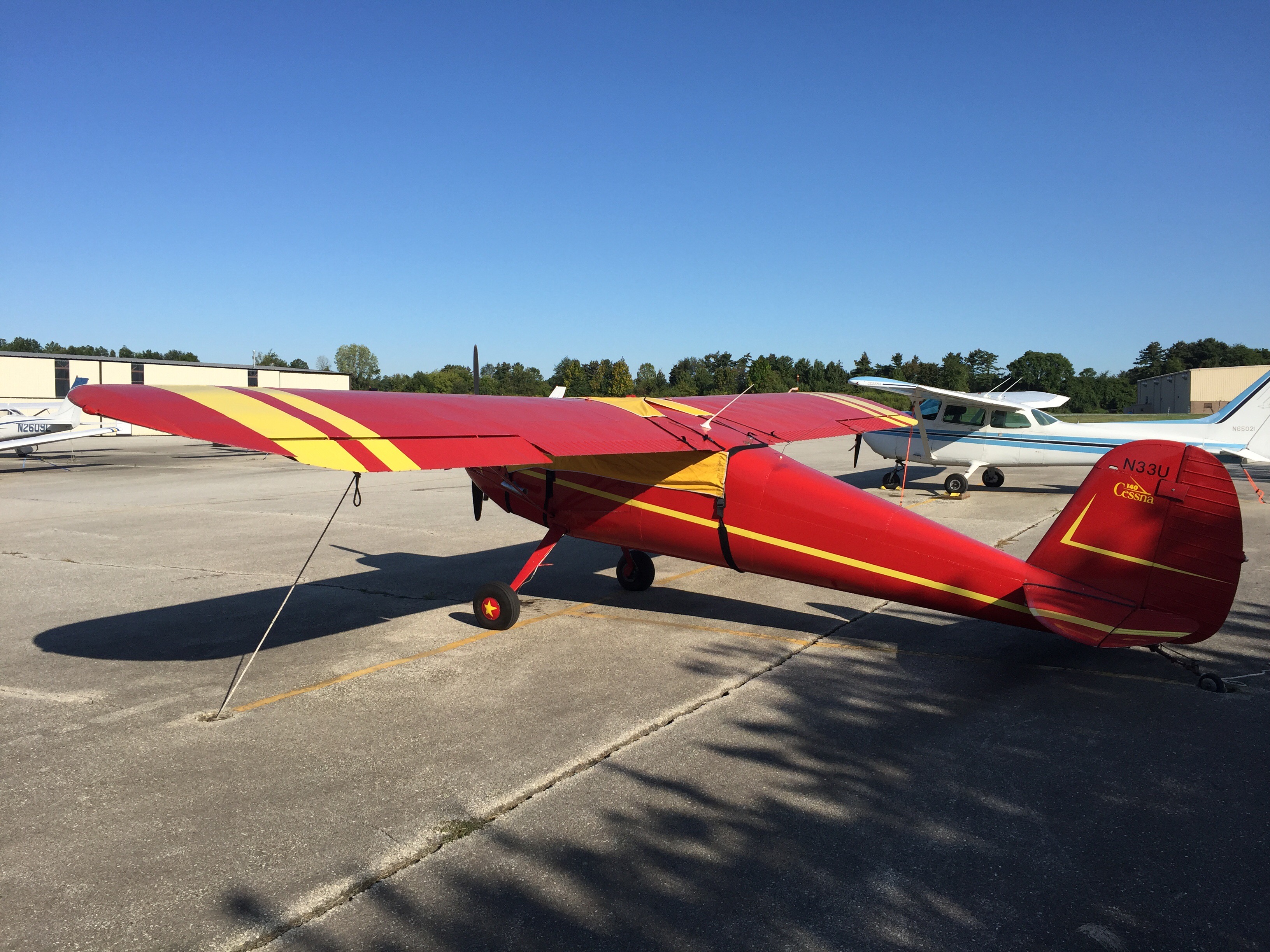
    There’s a new addition to the training aircraft on the ramp at my local field: this sweet little Cessna 140 tail dragger. Note the cool stars on the wheels.

    Share this:

    • Share on X (Opens in new window) X
    • Share on Facebook (Opens in new window) Facebook
    • Email a link to a friend (Opens in new window) Email
    • Print (Opens in new window) Print
  • Alphabet Challenge Leg 11: K (KKNB) to L (KLGB)

    2016-09-05

    |

    Flight Reports, PilotEdge, The PE Alphabet Challenge

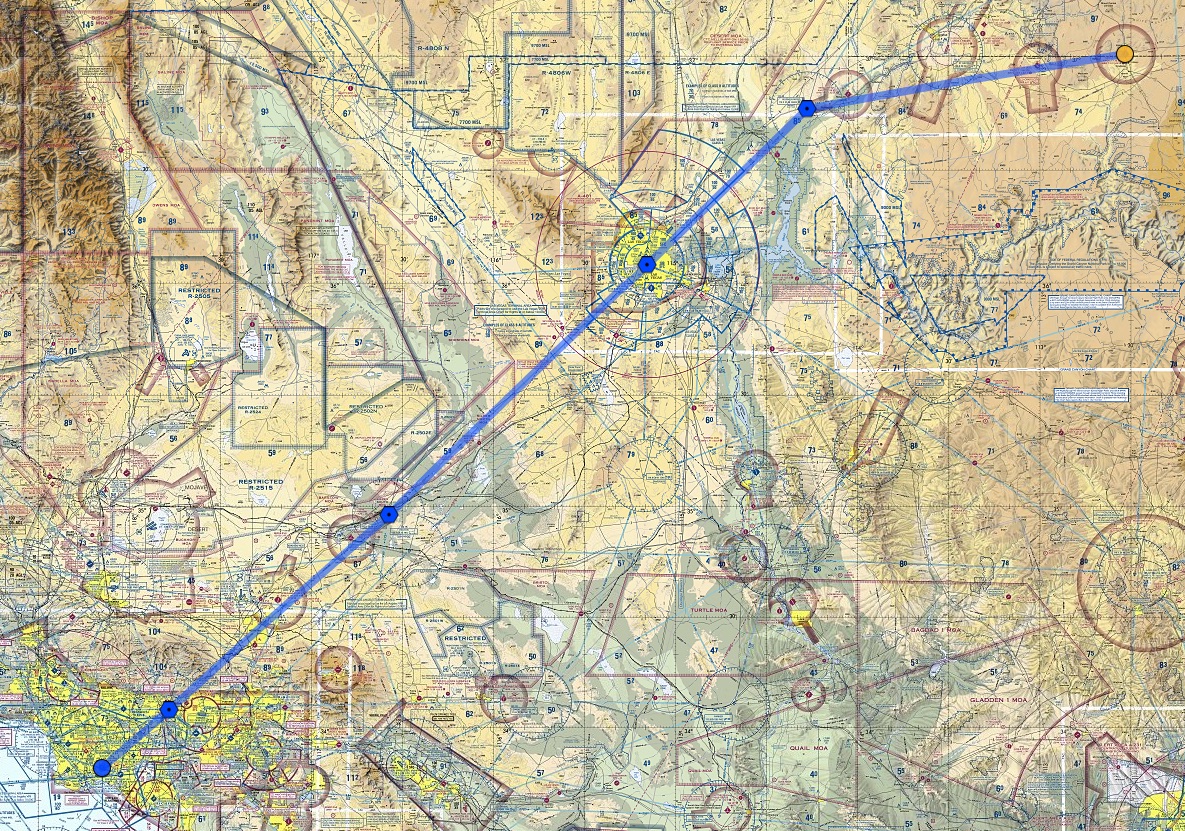
    Yesterday I was able to carve out about three hours to complete the next flight in the PilotEdge Alphabet Challenge, Kanab (K) to Long Beach (L). This is one of the longest flights in the series, logging in at 345 nautical miles with the route I’d planned, a VFR flight of KKNB MMM LAS DAG POM KLGB. You can see the flight plan here:
    ForeFlight_Web

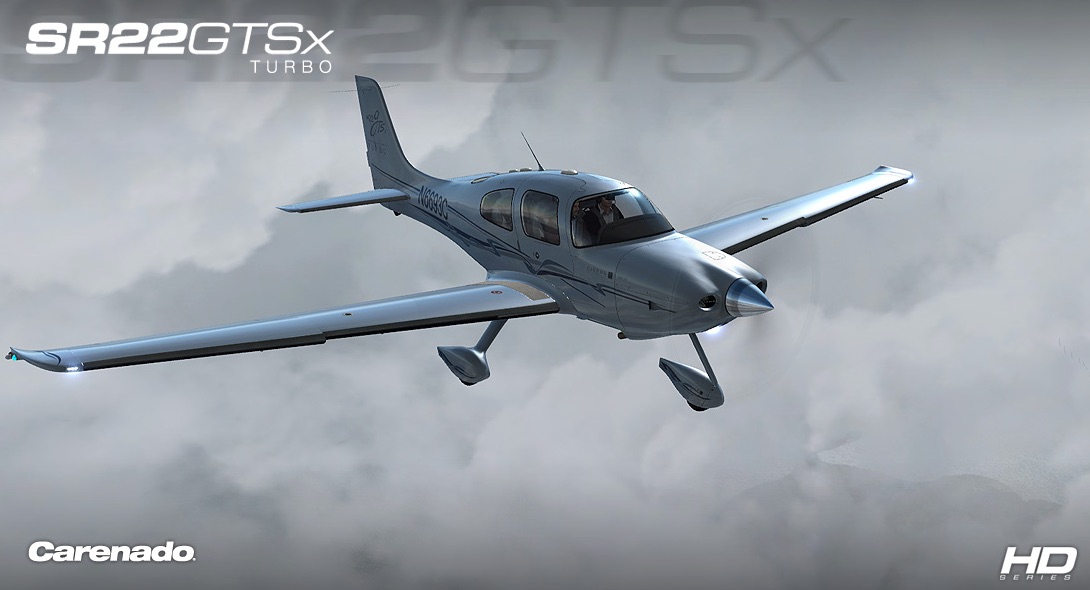
    To keep this flight a manageable length, I decided to fly it in the Carenado Cirrus SR22GTSX turbo, which would let me clip along at about 170 knots once I climbed to the 12,500 feet cruising altitude I’d planned. It’s a beautiful airplane in real and simulated life:
    Carenado_com

    Even with all that horsepower it was going to be about a two hour and five minute flight as we had headwinds, some 20 knots, the entire way. I departed Kanab on the CTAF frequency, and then once I was at 12,500 I picked up flight following by calling the PE LA Center frequency. Things went along fine from there, but there were missteps and complications along the way, each of which had its lessons:

    • Equipment can get in the way. I spent quite a bit of time in the early part of the flight messing with the plane’s autopilot. With a long flight ahead I decided I wanted this one to fly itself quite a bit of the way. But for some reason I couldn’t get it to arm for either altitude or navigation / heading. The Carenado autopilots typically play well with Saitek gear, so this was confusing to me. Eventually, about at the outskirts of Las Vegas, I said to heck with it and flew manual the rest of the way. With the winds this was like riding a wild horse, and it was fatiguing. After doing some research I learned that continued trim input can cause the AP to disengage. I did have the aileron trim tab set, and will test today to see if that in fact was the problem.
    • Don’t forget to actually set the squawk code. I kept waiting to hear “radar contact” from Center but it never came. When I finally asked if they had me they said, “no” and told me to cycle the transponder. I saw I was still squawking 1200, and when I suggested that actually setting the code might help I and the controller had a laugh.
    • Equipment failures happen. On this flight, the display on the FIP that shows my wet compass froze. I futzed with it some then flew via only the G1000 glass cockpit on the iPad. But the buttons on the FIP still seemed to work. I use those to toggle the COM and VOR radios, and in pushing them to see what was what I unknowingly switched over to COM2. After wondering where LA Center was for a while I switched back over to COM 1 and asked if I’d blown through a transition. They said no, but that they’d been looking for me. The redundant system on this is the light on the attenuator panel. That’s not working, and I need to fix it just as I would in a real airplane.
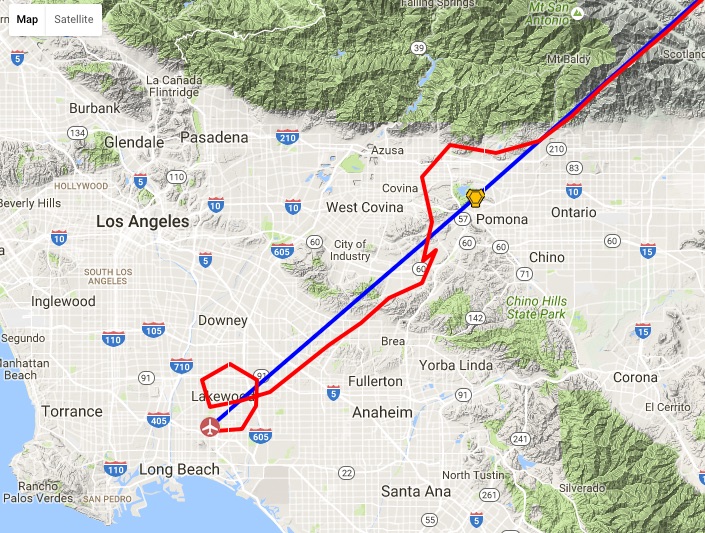
    • There’s more to learn on airspace. As I approached the LA basin I started my descent, assuming that SoCal Approach would handle my transition of the LA Bravo airspace. Not true, as the controller got on to advise me that I should probably get down below the Bravo shelf altitude (7,000 feet there) before going further as they would “not allow you to transition there.” I had been thinking that with flight following they’d handle passing me into the Bravo, but in reality you can only transition the LAX Bravo in a couple of places, and that’s not one of them. So I had to make a circling decent, avoid the Ontario Charlie, then duck under the LA Bravo, all of which you can see in the flight path image below. Normally this is easy but …
    • … wind and visibility are real complications. The wind was still howling on the descent, some 20-25 knots, and the plane was all over the place. And Active Sky 16 did a great job of rendering the haze in the LA valley, which limited visibility to about 10 miles. All told, it made for a very stressful, if still simulated, descent between holding onto the airplane, avoiding the Bravo and Charlie airspaces, and not being able to see very far. So distracting, in fact, that the aircraft got too fast and crashed, I think from exceeding the NTE speed. Good thing it’s a simulation, and luckily P3D quickly reloaded so I could continue (you can see this point in the flight path as the little jog in the line above the high 60 marker).
    PEaware____N15JG_KKNB-KLGB

    • Controllers can make mistakes, too. The Long Beach tower first gave me one approach, then realized they had the wrong airplane, so they gave me another approach. I though I was too close to the field to make the left hand turn it would require, so I looped north to make the right base into 25L. This confused him, too, but he said no worries and told me to just to head to the numbers for landing.
    • And finally, high-performance aircraft are a different kettle of fish, even in a simulator. Once I was in descent everything in the Carenado seemed to happen very, very quickly. There’s a big difference between 100 or 120 knots in a Cessna 172-182 and 150 knots in the Cirrus, and this is more true on final where you’re coming in at 90 instead of 65-70. I landed the thing, but with the wind and the speed it was rough going. You have to really be ahead of the game not the let the airplane get ahead of you.


    All told, the flight felt like a workout, and a very useful training session. The great thing about the sim and the software is that conditions can get quite real, and they can require real decision making. This flight had a lot of them, and I felt like my training brain was working nearly the entire time. I suspect that’s valuable as a student pilot. At least, I hope so.

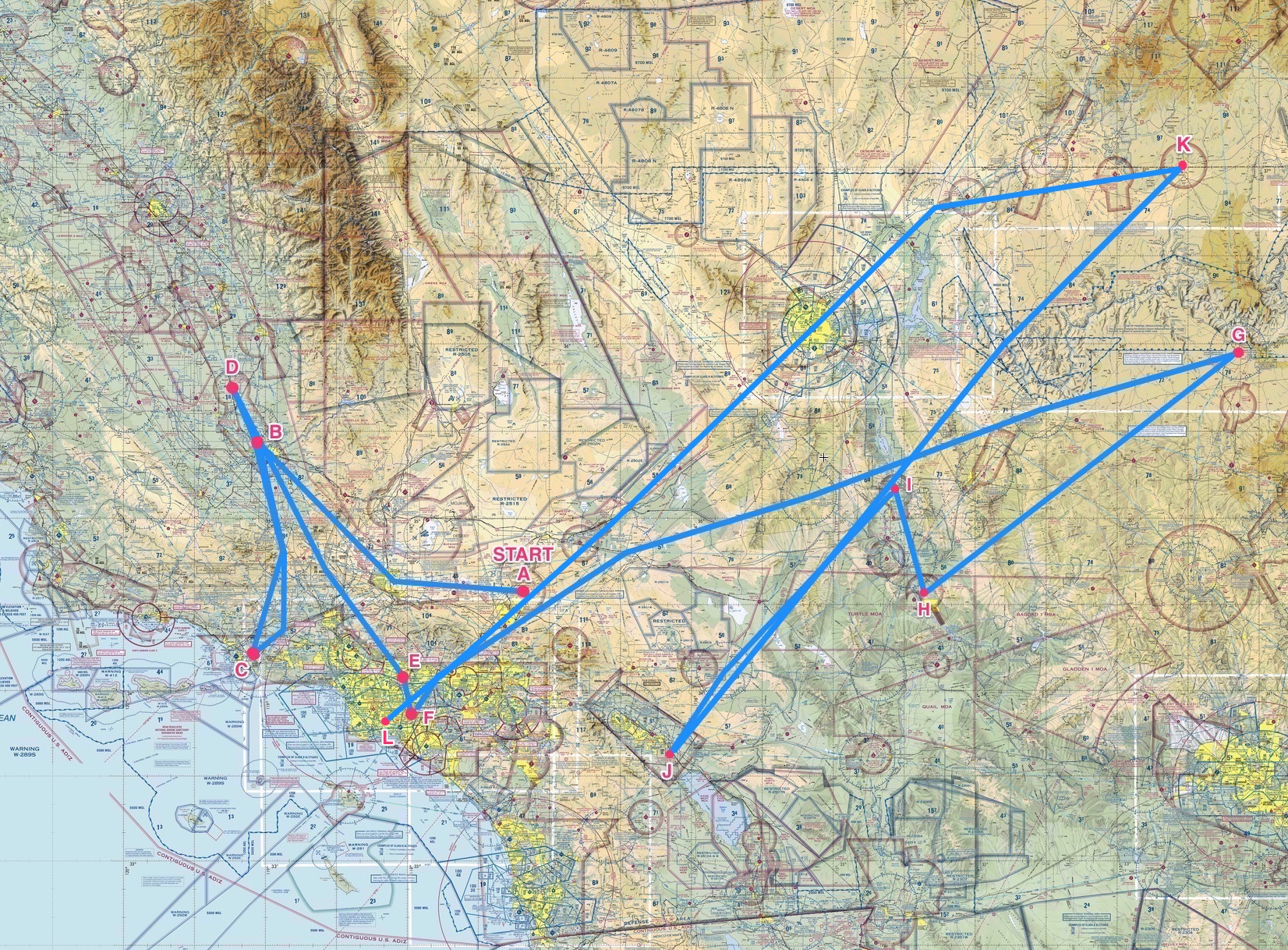
    The next flight is Long Beach to Montgomery Field. This will be my first flight on Pilot Edge into the San Diego area, and I’m looking forward to it. And here’s the challenge progress so far. 112 pilots have started the challenge, and only 59 have made it this far.
    Alpha_Challenge_In_Progress_3


    Share this:

    • Share on X (Opens in new window) X
    • Share on Facebook (Opens in new window) Facebook
    • Email a link to a friend (Opens in new window) Email
    • Print (Opens in new window) Print
  • PilotWorkshops.com

    2016-09-05

    |

    Links Worth Following, Resources

    Here’s a link worth following: www.pilotworkshops.com. PilotWorkshops runs an online proficiency center to provide professional training to general aviation pilots. With my membership to AOPA I get free access to their Pilot Proficiency Portal, but there are a number of free resources on the site as well, and many more for those who register. I look forward to using the site as I continue my real-world training, and many of the resources there would be a real value to any simmer interesting in making it “as real as it gets” with their own simulated pilotage.

    Share this:

    • Share on X (Opens in new window) X
    • Share on Facebook (Opens in new window) Facebook
    • Email a link to a friend (Opens in new window) Email
    • Print (Opens in new window) Print
  • A Floatplane Tour Of New York City X

    2016-09-04

    |

    Videos

    A reader request flight around the Drzewiecki Design New York City X scenery, using the Aerosoft Beaver float plane just for fun. Thanks for watching.

    Share this:

    • Share on X (Opens in new window) X
    • Share on Facebook (Opens in new window) Facebook
    • Email a link to a friend (Opens in new window) Email
    • Print (Opens in new window) Print
  • A2A 172/182 FIP Nav Gauges

    2016-09-04

    |

    Add Ons, Resources, Saitek

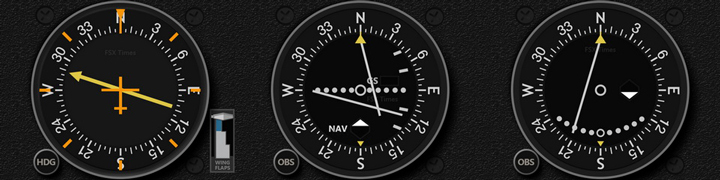
    a2a_cessna_nav

    A follow-up to this post: Tom Tsui has now released the Saitek FIP nav gauges for the A2A 172 and 182. Get them here. The engine gauges are next, although Tom says it may be a month or so before they’re available. If you’ve not used his FIP gauges, I highly recommend them. They look great, work perfectly, and his support is top notch. Getting FIP instruments that work correctly with the A2A LNAV set has been a problem for some time, and Tom has fixed it. Great job, Tom.

    Share this:

    • Share on X (Opens in new window) X
    • Share on Facebook (Opens in new window) Facebook
    • Email a link to a friend (Opens in new window) Email
    • Print (Opens in new window) Print
  • New A2A Cessna Gauges From Tom Tsui

    2016-09-03

    |

    Add Ons

    This morning I was happy to see that Tom Tsui at FSX Times has released a first set of Saitek FIP gauges designed specifically to work with the A2A 172 and 182. This is great news for any FIP user flying these aircraft, as they require unique coding to work with the A2A local variable set. As soon as the engine gauges are released I’ll be clicking the download link.

    Share this:

    • Share on X (Opens in new window) X
    • Share on Facebook (Opens in new window) Facebook
    • Email a link to a friend (Opens in new window) Email
    • Print (Opens in new window) Print
  • FSX Dual Video Review

    2016-09-03

    |

    Product Reviews, Videos

    I’d posted a written of this review some time back, but here’s a brief video review of the FSX Dual from Flight Sounds. It’s a great unit that I can highly recommend.

    Share this:

    • Share on X (Opens in new window) X
    • Share on Facebook (Opens in new window) Facebook
    • Email a link to a friend (Opens in new window) Email
    • Print (Opens in new window) Print
  • ForeFlight 8

    2016-09-03

    |

    Add Ons, Resources

    While I was away ForeFlight released version 8 of its great iPad and web-based electronic flight bag. I had a chance to play with it some over the past few days, and it’s a real upgrade of an already great product. I won’t go into the details here, as Sporty’s iPad Pilot News has an extensive summary online that’s well worth reading, but it’s worth the look for both your real-world and simulated flying. This is even more true with the recent updates to ForeFlight 8 on the web, which make it an online flight planning tool at least equal to SkyVector, especially now that the route you plan online immediately syncs to your iPad.

    Oh, and how does one connect ForeFlight with Prepar3d or FSX? Via the FSXFlight plugin. It costs a few bucks, but it works seamlessly.

    Share this:

    • Share on X (Opens in new window) X
    • Share on Facebook (Opens in new window) Facebook
    • Email a link to a friend (Opens in new window) Email
    • Print (Opens in new window) Print
Previous Page
1 … 43 44 45 46 47 … 59
Next Page

On The Glideslope

  • Instagram
  • Facebook
  • X

Loading Comments...

You must be logged in to post a comment.