On The Glideslope

  • How To
    • How I Configure For VR In X-Plane
    • How To Have Dual Controls In X-Plane
    • How To Configure X-Plane 11 For Multiple Screens
    • How To Create Custom Cameras In P3D
    • How To Get Started With X-Plane 11
  • Resources
    • Schematics
    • Center Console Plans
    • Basement Sim Video Tour
    • Screen Configurations
    • A2A LVAR List PDFs
    • How To Talk ATC
    • Cessna 172 Cabin Dimensions
    • USB u0026 Saitek
  • Reviews
  • What’s In The Sim
  • About OTG
    • About OTG
    • The Construction Journey
  • A New Saitek FIP

    2016-04-22

    |

    PC Hardware, Saitek

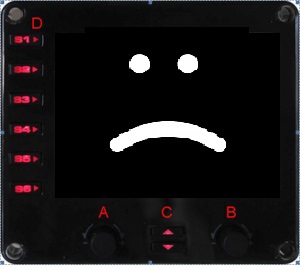
    For the past several months I’ve had some weird behavior on one of my Saitek Flight Information Panels: it would display an instrument gauge, but the gauge would be off-center, either shifted to the left (or right), or even up or down, from center. This would create weird scenarios where half the gauge would be on the right side of the display, with the other half “wrapped” over on the left side. The colors would also be off, with greens being red, reds being blue, etc. And if I pressed the button to switch gauges, the off-centering and coloring would change. This happened regardless of which USB hub into which I plugged it the FIP.

    For a while I thought it was about the hub, or how much power the FIP was getting from the hub, because the symptoms could go away for a time after I would change these things around. But lately it’s been persistent, and I finally said “screw it” and found a new FIP on Ebay for a great price. I plugged it in today, and everything was great. So it wasn’t the hub, it was the panel. A lesson learned in case you’re having a similar symptom.

    Share this:

    • Share on X (Opens in new window) X
    • Share on Facebook (Opens in new window) Facebook
    • Email a link to a friend (Opens in new window) Email
    • Print (Opens in new window) Print
  • Night Ops

    2016-04-22

    |

    Videos

    Last night I made a night flight from KSLC to KCNY, and here is a short video of the cockpit in its night configuration. The scenery is Mega Scenery Earth Utah, and the lighting is Taburet. Also note the new iPad yoke mount …

    Share this:

    • Share on X (Opens in new window) X
    • Share on Facebook (Opens in new window) Facebook
    • Email a link to a friend (Opens in new window) Email
    • Print (Opens in new window) Print
  • How To Talk ATC

    2016-04-20

    |

    PilotEdge, Resources

    As I’ve been learning my way around PilotEdge I have by necessity been learning my way around the language of Air Traffic Control. One thing I’ve noticed is that sometimes pilots on PE seem to be working hard to sound “official,” whereas what I’ve noticed when listening to the real thing is that real-world pilots (and GA pilots with ATC in particular) are talking an official language but sounding natural (and often, like normal human beings). I’m certain much of that comes with familiarity, and remembering that the controller is, in fact, a person who wants to help you rather than someone waiting for you to screw up.

    To that end, here are two resources from the Aircraft Owners and Pilots Association on talking with ATC: their new pilot’s guide to ATC communication, and their PDF document, Communicating With ATC: Learn to Talk Like a Pro. Both are worth reading, as I’m sure that the better you get at knowing the official language, the sooner you’re able to manage it in a familiar and human way.

    Share this:

    • Share on X (Opens in new window) X
    • Share on Facebook (Opens in new window) Facebook
    • Email a link to a friend (Opens in new window) Email
    • Print (Opens in new window) Print
  • PilotEdge, Take 3 (And A Rating To Boot)

    2016-04-19

    |

    PilotEdge

    The past few days I’ve been writing about my trial on PilotEdge, the as-real-as-it-gets subscription ATC service that covers most of the SoCal operating area. My first flight was all nerves (and a learning moment), the second more relaxed and fun. Today I went for flight number three, which was an attempt to qualify for the introductory VFR rating in the PilotEdge training curriculum (what they call a V-01 rating).

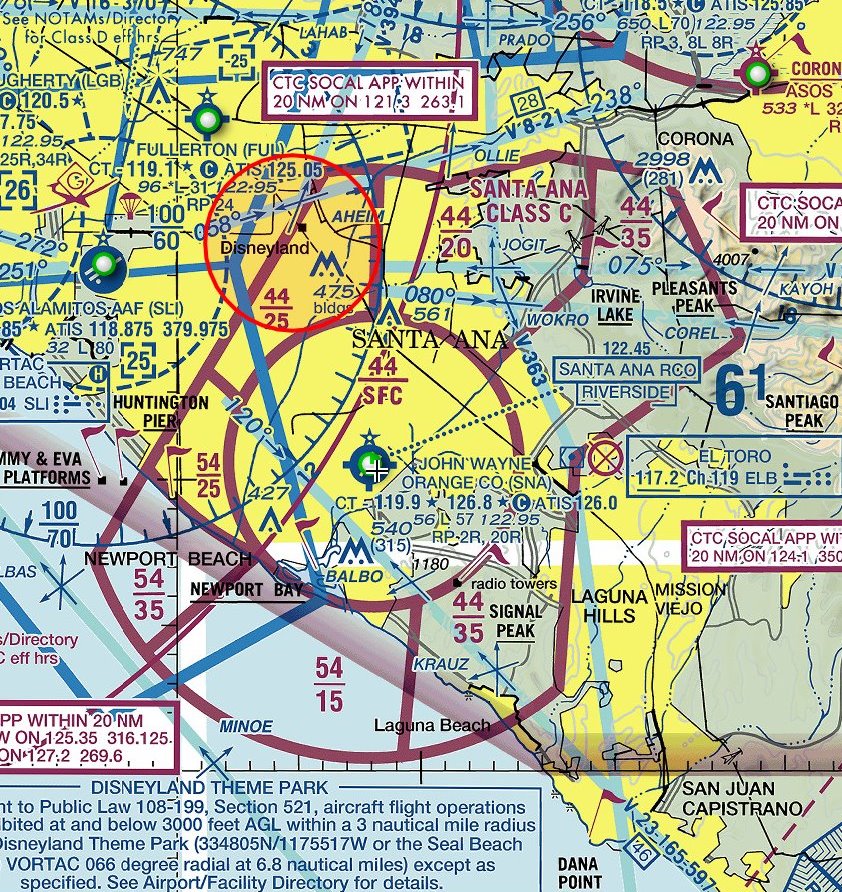
    To qualify for the V-01 rating the pilot needs to start from the ramp at a controlled airport, get clearance to do pattern work (fly “closed traffic”), transition from clearance delivery to ground to tower control, make three loops of the pattern, and exit back to the ramp, all under ATC control and observation. I decided to do this at John Wayne Airport (KSNA) both because it is the airstrip used in the training examples, and because it’s Class C airspace and in a busier area of the coverage territory. I flew a few touch-and-go laps of the pattern there last night while not on PilotEdge just to get used to the scenery and pattern, and then today over lunch gave it a go.

    KSNA
    KSNA (John Wayne AKA The Duke)

    It all went great, and I qualified for the V-01 rating on the first try. Now I can go to the next level of training, which is a point-to-point VFR flight with ATC flight following. The controller was great, and I did pretty well every step of the way. The PEAware tracking system captured the trace of my flight even though there was no flight plan as I was in tower control the entire time.

    PEaware____N15JG_KSNA-KSNA

    PEaware____N15JG_KSNA-KSNA 2

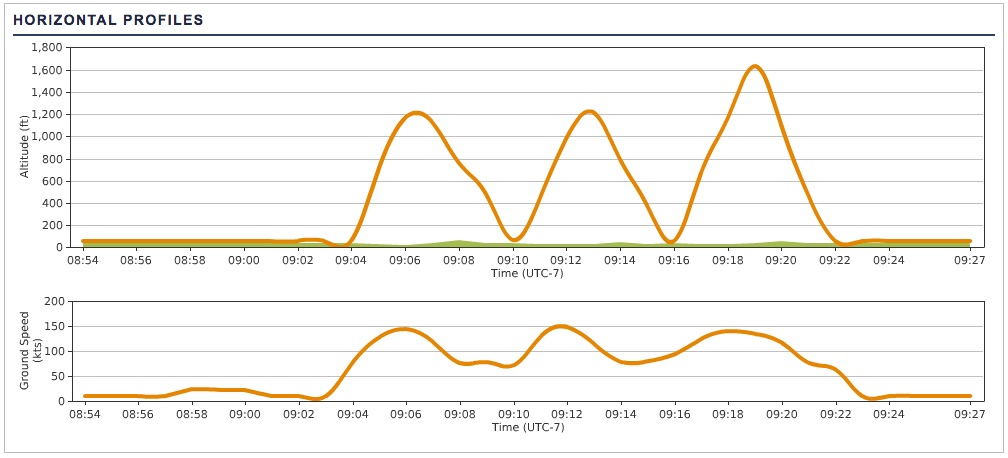
    The trace reports in time intervals, so it’s not a smooth trace, but you can see the pattern. I’m going faster downwind than upwind, which is why those turns are a bit more oblong. And I need to work on staying to pattern altitude (1,00o feet in this case – gotta work the trim wheel a bit). But overall all went well and I look forward to the next bit of learning and training on PilotEdge.

    Share this:

    • Share on X (Opens in new window) X
    • Share on Facebook (Opens in new window) Facebook
    • Email a link to a friend (Opens in new window) Email
    • Print (Opens in new window) Print
  • PilotEdge, Take Two

    2016-04-17

    |

    PilotEdge

    This afternoon I returned to PilotEdge for a second flight, with the good and not-as-good of last night under my belt as experience. Taking the advice of the PE forums seriously, I spent some time in the PE pilot resource center, and watching most of the general VFR workshop in particular (and now I’m a much better reader of VFR charts in particular … who would have thought that all that magenta-bordered class E airspace was so run of the mill?).

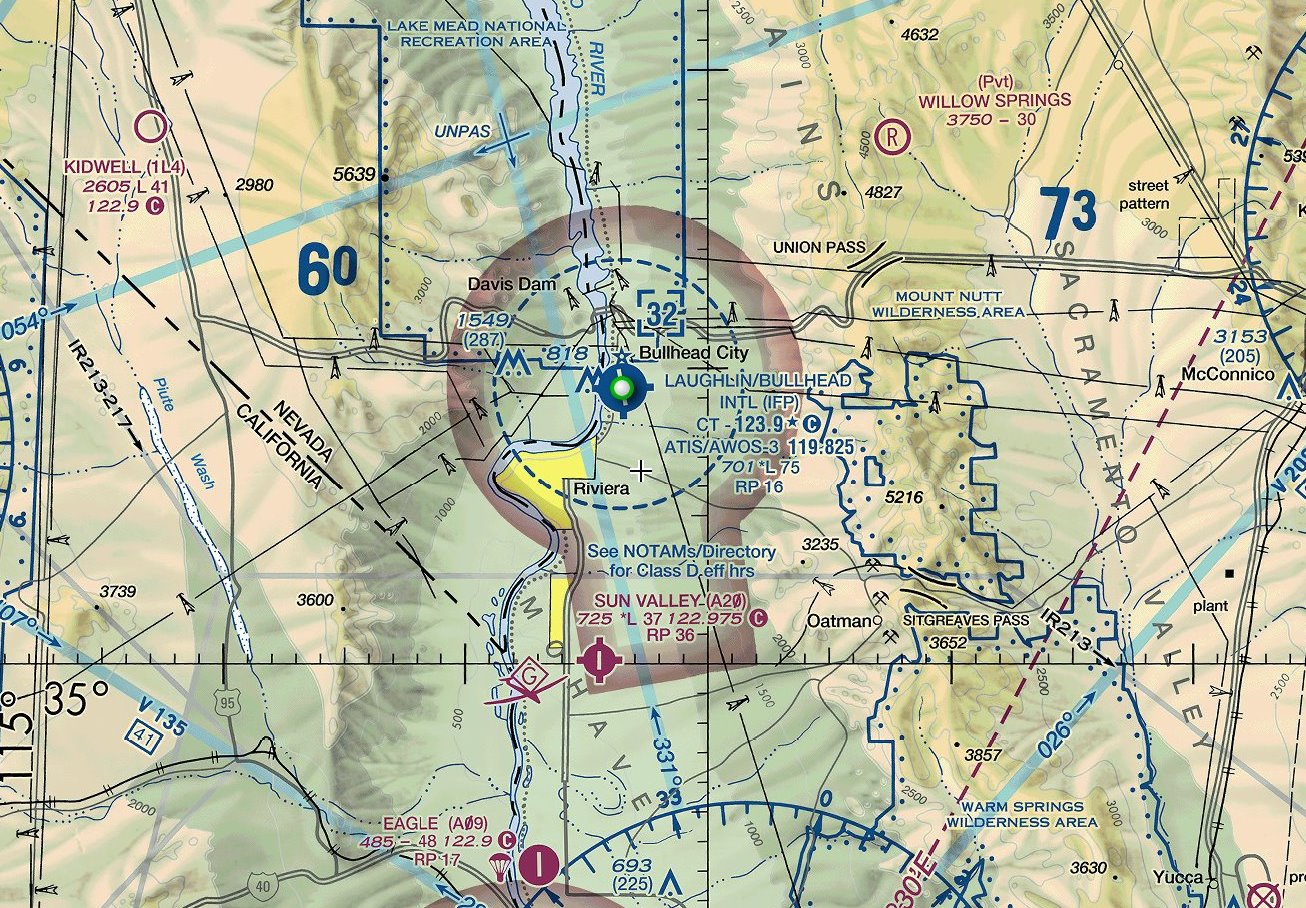
    My plan was to practice touch-and-gos, in a tower-controlled pattern, but far away from the more crowded airspace of Los Angeles. Looking at the PE coverage map I settled on Laughlin/Bullhead airport in Laughlin, NV (KIFP). Class D (which is what that dashed-blue circle means), controlled, but very quiet. A good place to get familiar with the calls and process before going for a V-01 rating on PE.

    Microsoft-Edge-Web-Notes-SkyVector161509484

    Everything went great. I was much less nervous that last night, started up the SimCessna, got a radio check and weather, then got taxi clearance and departure clearance from the PE controller. Made my crosswind, downwind, and base turns, and was cleared for final. About then I noticed that the Saitek information panels in the sim had crashed (unusual … I dallied with a SPAD.neXt driver install last night and think things are still tweaked). This meant I had no airspeed or engine data. I realized this just as I was on short final, maybe a mile out.

    “What would happen in the real world?” I thought. “You’d call off the touch-and-go and ask for a full stop landing,” I replied to myself. So that’s what I did: I called KIFP tower (and this was on very short final), said airspeed was inop, and asked for a full stop. “No problem,” he said. I landed, taxied off, and got direction to taxi to the ramp on the frequency. I did so, then let the controller know that I was going to disconnect to solve the sim issue. “No problem,” he said.

    It was all very cool. Very real (for not being real). I’m definitely hooked on PilotEdge. It absolutely adds an entirely new and significantly richer texture to the sim experience. And using it means learning, which is always good. I’m all in on PE.

    (As an aside, I had a member of the PE forums give me some advice on my mistake from last night, both in the forums and on the OTG Facebook page. Turns out that commenter, Kyle Sanders, was actually my controller for this flight. I had no idea he was a PE employee. He said I did great, which I was glad to hear. The Interwebs are an amazing place …)

    Share this:

    • Share on X (Opens in new window) X
    • Share on Facebook (Opens in new window) Facebook
    • Email a link to a friend (Opens in new window) Email
    • Print (Opens in new window) Print
  • Flying On PilotEdge (And On Being A Noob)

    2016-04-17

    |

    PilotEdge

    One of the things that’s a challenge with simulation flying is realistic air traffic control. There is automated ATC in the software, which you interact with via a keyboard. It sounds OK, but ties you to the keyboard and shows a window on screen, both of which can kill the immersion. It also is very basic in giving routing and separation directions, and does not follow the vast majority of real-world instrument flight rule procedures. You can also use an add-on like Multi Crew Experience, which when configured well does a pretty good job of recognizing what you say into the headset and interpreting it as the right keyboard direction. But both interrupt the simulation immersion in their own ways.

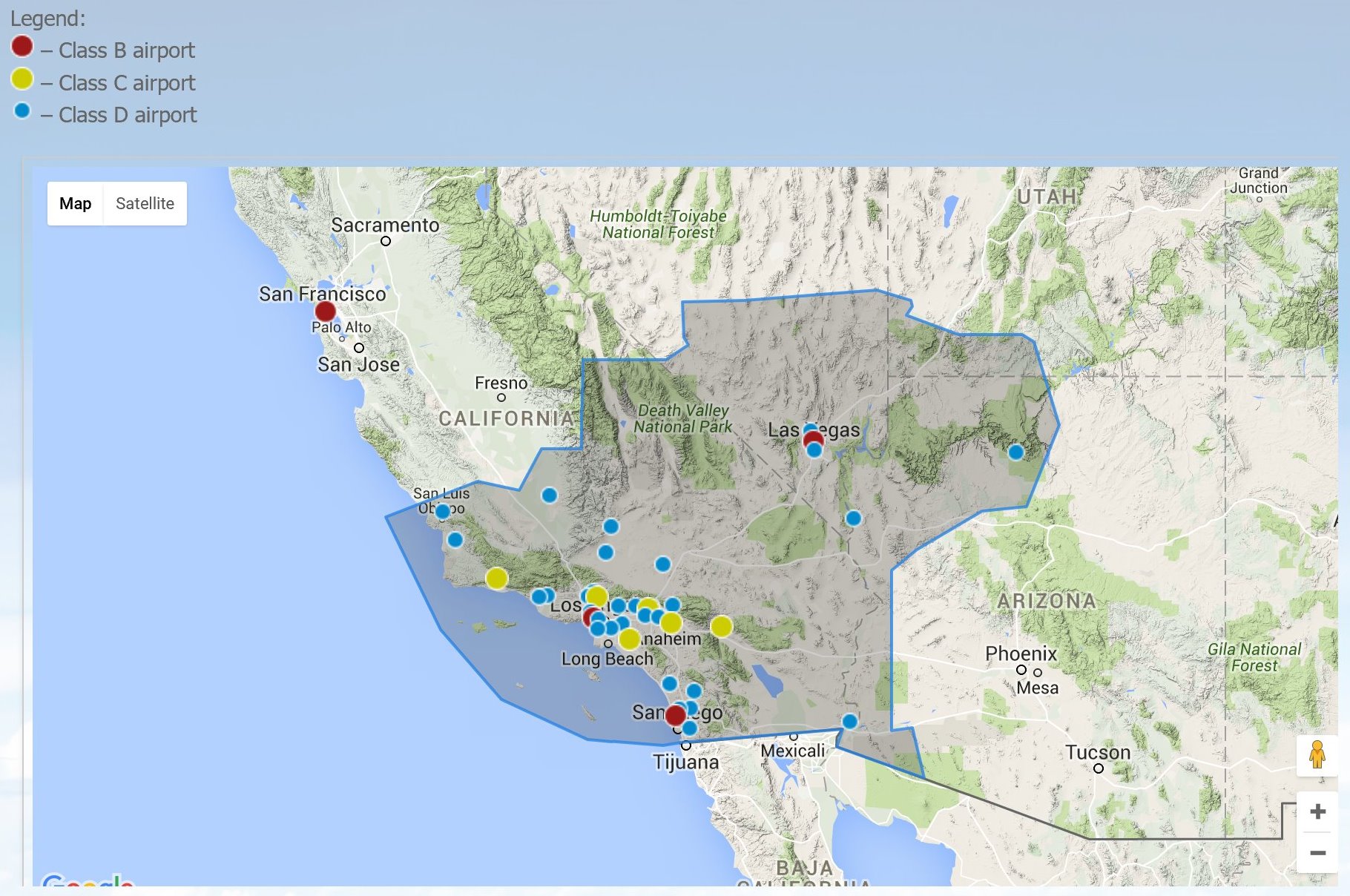
    There are two other very popular options, VATSIM and IVAO. They are staffed by a mix of hobbyists, ATC operators in training, and the real thing. While popular, the critique is that they can be very inconsistent, both in what is covered when (that’s left to the ATC nerds online, not the simulation nerds, and often in the US there are just a few towers and centers up and running), and in their realism. So last night I signed up for a free 14-day trial (and did my first flight) on PilotEdge. PilotEdge is a subscription service that offers a very realistic ATC training environment, 15 hours each day, over a large swath of Southern California and parts of Arizona, Nevada, and Utah:
    Microsoft-Edge-Web-Notes-Operating115362421

    How realistic? Extremely. The business was founded and is staffed by real air traffic controllers, using realistic equipment, and managing the airspace just as they would if they were in the tower. The folks who fly on PilotEdge are typically either simmers in search of realism, real-world pilots keeping their skills fresh, or flight students practicing with their instructors. Just about everyone who has used PilotEdge has had roughly the same thing to say about it: this is as real as it gets, and these guys are by the book. (You can hear for yourself here.)

    So last night, toward the end of the coverage day when things weren’t too busy (just five or six live pilots online but hundreds of drone aircraft filling the skies) I completed my first flight on the network. This is a suggested intro flight from L52 (Oceana) to KSBP (San Luis Obispo). Given that I’m not a real-world pilot, but a guy who has gotten increasingly serious about simulation, this was my first time dealing with anything this … real. And it was cool.

    The only stuff I know about VFR flight rules is what I’ve been able to read and learn in the sim. So to prep I watched a training video of the suggested intro flight, and flew it a few times before logging in to get my wits about me. Still, I can’t believe how nervous I was. It was ridiculous. Truly. Even though this is all simulated, I knew I was in new waters, where I could not touch the bottom, surrounded by people for whom this is their job.

    Nonetheless, I thought I handled myself well. I wasn’t sure if the push-to-talk switch on the yoke was configured right, so while at L52 (which is an unmanned airport with no ATC) I got on the San Luis tower frequency and got a radio check. “Loud and clear,” he said. Wow. A real person talking to me on the basement sim. Amazing. I announced my departure intentions on the L52 frequency, contacted KSBP tower once out of the pattern, and got instruction to “make straight in for runway 29 and report when on two mile final.” Cool! I made the final call on two mile final, got clearance to land, and even though I was ridiculously anxious I greased the landing. I made a right-hand turn off 29 and waited for direction.

    I was feeling pretty good about myself. So much so that I sort of stopped paying close attention and I missed a call from tower. “Was that to me? Was he talking to me?” A few seconds later I thought, “Did he tell me to taxi to the ramp? He must have.”

    So continue to taxi I did. Wrong move, bucko. The next thing I heard was: “Uhh … Cessna 5 Juliet Golf, where are you going?” The tone, which inferred a “seriously?” at the end of the sentence although it was unspoken, was more notable to me. I cringed, and I apologized that I had missed the call. A brief but well deserved (and terse but not impatient) reminder to wait for instruction after leaving the runway followed. I didn’t tell him I was a noob. I figured I probably didn’t have to.

    I woke up this morning excited to do it again, and I’ll be sending in my check. I’ll also be hitting the trainings and workshops — and there are training ratings for PilotEdge as well as many hours of instruction workshops — because I definitely want to get good at this.

    Share this:

    • Share on X (Opens in new window) X
    • Share on Facebook (Opens in new window) Facebook
    • Email a link to a friend (Opens in new window) Email
    • Print (Opens in new window) Print
  • Windows 10 10586.218 Borks Saitek FIPs

    2016-04-16

    |

    Saitek, Windows 10

    At least it did mine. After the auto-install of the latest Windows 10 comprehensive update two things happened. First, and for the first time, my Saitek panels and FIPs showed up correctly (with little icons and everything) in Windows Device Manager. That’s good. But the FIPs also weren’t loading any gauges. That’s bad.

    fip-frown

    A quick re-installation of the most recent Saitek drivers had everything quickly ship-shape. I also had to re-run Alexy’s FIP Customizer (well worth the download and found via Tom Tsui) to return the nice, solid black background that I prefer to the dormant FIPs.

    Share this:

    • Share on X (Opens in new window) X
    • Share on Facebook (Opens in new window) Facebook
    • Email a link to a friend (Opens in new window) Email
    • Print (Opens in new window) Print
  • How I Nearly Blew Up The Universe … But Didn’t

    2016-04-15

    |

    PC Hardware

    This afternoon I decided it would be a good time to update the BIOS on the sim PC’s Asus Hero VIII motherboard. It’s running v. 603, which is the one it came with an which is about a year and several generations old now. The download and flashing process were easy enough, and the PC booted to the new BIOS setup screen without any problems. Well, one problem: the PC now no longer saw the internal solid state drive, which happens to be where Windows 10 is installed. As a result, the PC could not boot to Windows (and certainly not to Prepar3d, which is also on that drive).

    Much digging and probing ensued, followed shortly by panic, as I was worried that I may have turned the entire basement sim into an interesting piece of installation art. I reverted a version on the BIOS. I reverted all the way back to 603 on the BIOS. I tweaked and prodded and nudged about every setting in the BIOS setup I could find. No dice – the PC still only showed the optical and hard drives. I googled 37 variations of “I updated my BIOS and now the PC can’t see my SSD.” I even went so for as to take off the PC side panels and pull out the NVIDIA 980ti graphics card and the Intel 750 SSD so I could get a better look at what was going on (and thinking that maybe I could plug the SSD into another SATA port). While doing this I noticed that the SSD SATA connection was non-traditional. It connected to sort of an add-on mini PC board on top of the motherboard. It said “hyper” something on it.

    “Hmmmm …,” I thought. “That’s curious.”

    It turns out that the curiosity was an Asus Hyper Kit, which converts the M.2 SATA connection to the U.2 cable attached to the Intel 750 SDD.

    3D-1
    Oh, so YOU’RE the problem …

    I knew from checking the Asus manual that the motherboard had an M.2 connection on it about where this thing was attached. I’d also read in a thread during my research that M.2 connections can disable other SATA ports on the board depending on their settings. Thinking this might be the problem, I did some Googling and found this thread, which ultimately led me to understanding that the advanced storage settings on the BIOS have an “Enable Hyper Kit Mode” setting. That was set to “DISABLED” in the default, post-flash BIOS settings. Flip that little switch, and things fire right up.

    So there you go. Another thing learned.

    Share this:

    • Share on X (Opens in new window) X
    • Share on Facebook (Opens in new window) Facebook
    • Email a link to a friend (Opens in new window) Email
    • Print (Opens in new window) Print
  • Out Of The Clouds

    2016-04-14

    |

    Videos

    The other day I was on a flight (a real one) from Dallas. There were overcast conditions, and as we broke out of the clouds there was a very nice view of the cloud deck out the window, so I shot a short video. The sense of speed was also cool.

    Share this:

    • Share on X (Opens in new window) X
    • Share on Facebook (Opens in new window) Facebook
    • Email a link to a friend (Opens in new window) Email
    • Print (Opens in new window) Print
  • Ready To Go

    2016-04-13

    |

    Photos

    Share this:

    • Share on X (Opens in new window) X
    • Share on Facebook (Opens in new window) Facebook
    • Email a link to a friend (Opens in new window) Email
    • Print (Opens in new window) Print
Previous Page
1 … 54 55 56 57 58 59
Next Page

On The Glideslope

  • Instagram
  • Facebook
  • X

Loading Comments...

You must be logged in to post a comment.