On The Glideslope

  • How To
    • How I Configure For VR In X-Plane
    • How To Have Dual Controls In X-Plane
    • How To Configure X-Plane 11 For Multiple Screens
    • How To Create Custom Cameras In P3D
    • How To Get Started With X-Plane 11
  • Resources
    • Schematics
    • Center Console Plans
    • Basement Sim Video Tour
    • Screen Configurations
    • A2A LVAR List PDFs
    • How To Talk ATC
    • Cessna 172 Cabin Dimensions
    • USB u0026 Saitek
  • Reviews
  • What’s In The Sim
  • About OTG
    • About OTG
    • The Construction Journey
  • The I-4 Rating On PilotEdge

    2017-04-06

    |

    PilotEdge, Videos

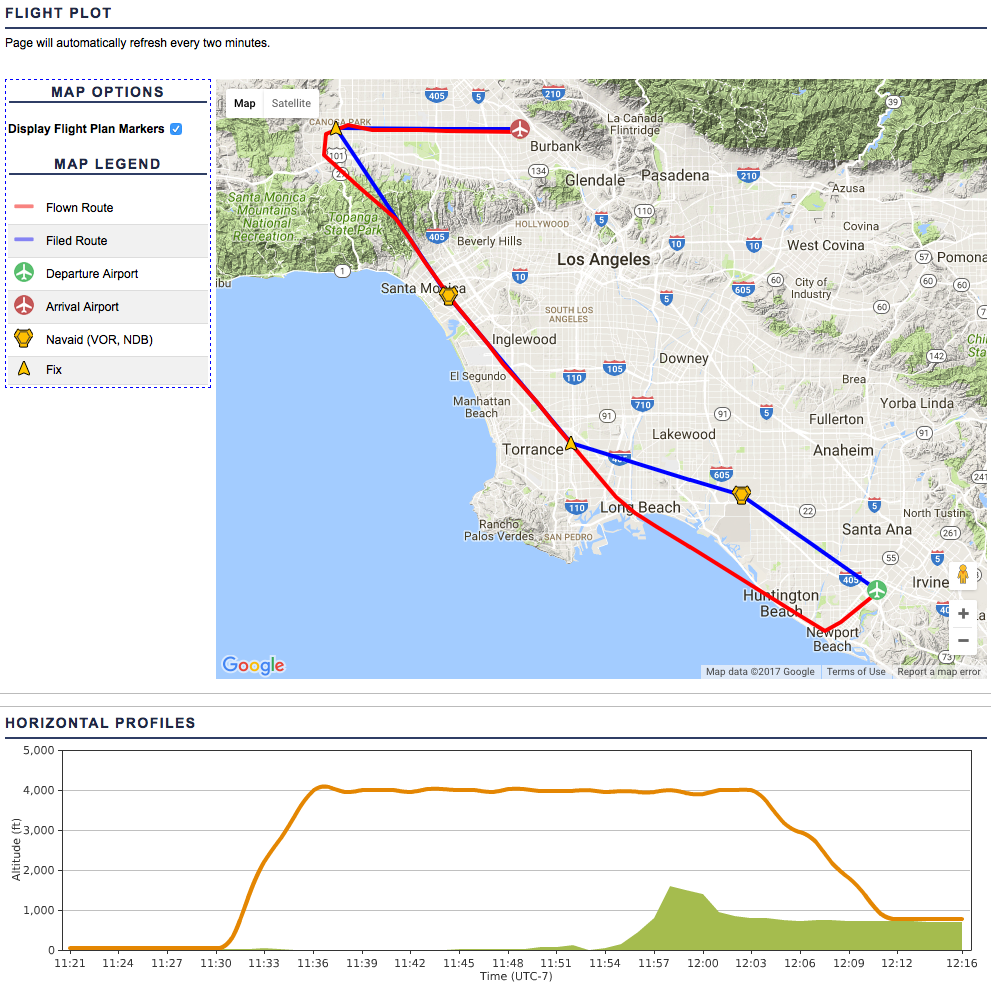
    We follow up the fail/pass sequence of the I-3 with the I-4 rating on PilotEdge. This is “Dealer’s Choice,” where the controller picks a destination and you must identify, file, and fly the correct TEC route. I get SNA to SMO, and I pass, but not cleanly. There are a lot of learning experiences along the way and several complicating things that happen (like broken transmissions from ATC) that could easily happen on a flight in real life. I’m glad to have flown this, and am now studying SIDs and STARs for the I-5. As always, thanks for watching.
    Share this:

    • Share on X (Opens in new window) X
    • Share on Facebook (Opens in new window) Facebook
    • Email a link to a friend (Opens in new window) Email
    • Print (Opens in new window) Print
  • PilotEdge I-3 Take Two

    2017-04-04

    |

    PilotEdge

    Second time’s the charm. Same conditions as the first attempt: overcast 1,700 to 3,700, no GPS/moving map, no autopilot, hand flying the whole way. On to the I-4 …

    PEaware____N15JG_KSNA-KBUR

    Share this:

    • Share on X (Opens in new window) X
    • Share on Facebook (Opens in new window) Facebook
    • Email a link to a friend (Opens in new window) Email
    • Print (Opens in new window) Print
  • PilotEdge I-3 Failure

    2017-04-04

    |

    PilotEdge

    One of the things I love out PilotEdge is its training programs: the CAT ratings for VFR ATC procedures and the I ratings for IFR ATC procedures. I’ve completed the original V ratings (now retired) and most of the CAT ratings, as well as the first two I ratings. In this flight I attempt the I-3, which is an IFR TEC route flight from John Wayne to Burbank. I fail it, for many good reasons. It was an interesting learning experience so I thought I’d share it.

    Share this:

    • Share on X (Opens in new window) X
    • Share on Facebook (Opens in new window) Facebook
    • Email a link to a friend (Opens in new window) Email
    • Print (Opens in new window) Print
  • Tom Tsui’s PFD Is Out

    2017-04-04

    |

    Saitek

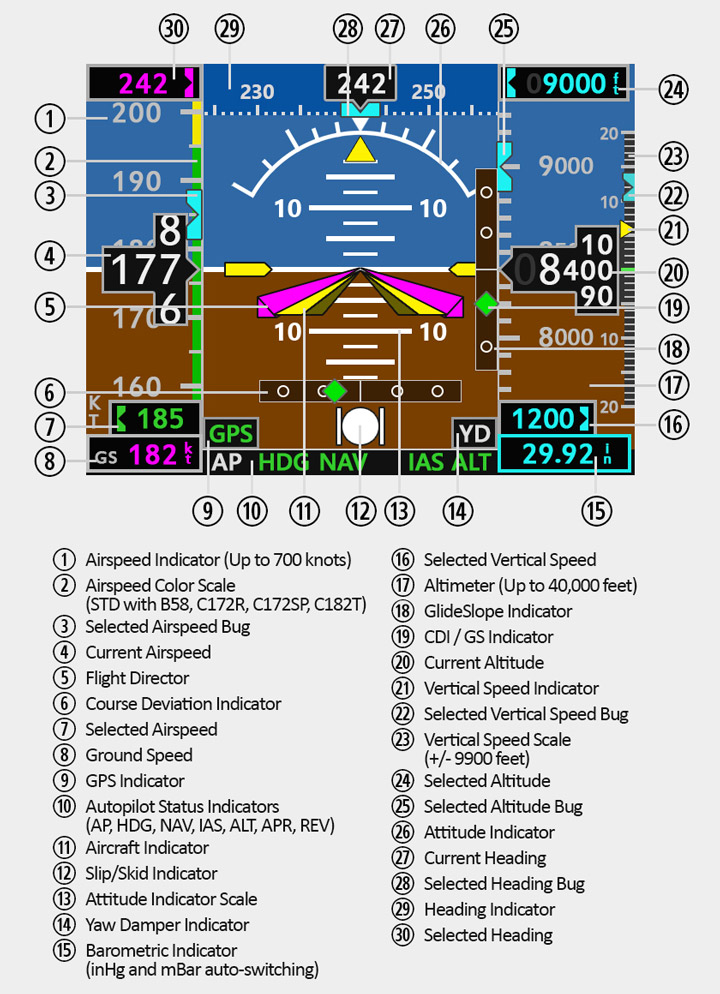
    Saitek FIP owners, Tom’s primary flight display is now available. Like all his gauges, it seems worth every penny. I’ll be getting mine today and it will serve the right seat.

    pfd_all_position_exts

    Share this:

    • Share on X (Opens in new window) X
    • Share on Facebook (Opens in new window) Facebook
    • Email a link to a friend (Opens in new window) Email
    • Print (Opens in new window) Print
  • This Morning’s View

    2017-04-02

    |

    Uncategorized

    Share this:

    • Share on X (Opens in new window) X
    • Share on Facebook (Opens in new window) Facebook
    • Email a link to a friend (Opens in new window) Email
    • Print (Opens in new window) Print
  • The Saratoga …

    2017-04-01

    |

    Point To Point

    … after spending a few days on the ramp in Spokane, is now at Glacier Park International, just north of Kalispell, MT. 

    Share this:

    • Share on X (Opens in new window) X
    • Share on Facebook (Opens in new window) Facebook
    • Email a link to a friend (Opens in new window) Email
    • Print (Opens in new window) Print
  • Video Of The Wednesday Walkabout On PilotEdge

    2017-04-01

    |

    PilotEdge, Videos

    This is a full-flight video with just a few edits from my Monterey to Burbank hop during last week’s “Wednesday Walkabout” fly-in on PilotEdge. I’ve spent a lot of time in the sim, but I have to say this was likely my favorite flight in the simulator to date.

    It’s only about an hour, but in that time there’s a line-up-and-wait, plenty of departure and enroute traffic, a California sunset, transition to night ops, several minutes of zero-visual-reference blackout instrument flying, 220 knot ground speeds, vectors over LA, simultaneous arrivals and departures at Burbank, and handoffs between seven different PilotEdge controllers. And several lessons as well, including “Don’t Forget To Switch Over To Approach” and the very important “Be Careful About Attitude And Altitude When You Have No Horizon.” It was just great, and thanks to K. Smith and the PE crew for making this event such a success.

    Thanks for watching and I hope you like it.

    Share this:

    • Share on X (Opens in new window) X
    • Share on Facebook (Opens in new window) Facebook
    • Email a link to a friend (Opens in new window) Email
    • Print (Opens in new window) Print
  • Daytona Gears Up Landing

    2017-03-31

    |

    Uncategorized

    You may have seen this already, but if not, it’s worth watching. Everyone involved in this process was a pro, and this pilot was cool as a cucumber throughout. Amazing, at least to me.

    Share this:

    • Share on X (Opens in new window) X
    • Share on Facebook (Opens in new window) Facebook
    • Email a link to a friend (Opens in new window) Email
    • Print (Opens in new window) Print
  • How To Disable NVIDIA Share

    2017-03-31

    |

    How Tos

    Just a few minutes back I was recording a flight on the PilotEdge servers that they will be able to use as a drone in the Western US Expansion area. Just as I was entering the downwind leg of the designation airport my sim crashed – which is only the second system crash I’ve had in X-Plane – making the flight a bust.

    This frustrated me.

    The culprit was “NVIDIA Share,” which seems to have crashed first, thence crashing the sim. I have since researched how to disable it, and here’s how you do so. Who knows – it may free up some processing headroom as well.

    Share this:

    • Share on X (Opens in new window) X
    • Share on Facebook (Opens in new window) Facebook
    • Email a link to a friend (Opens in new window) Email
    • Print (Opens in new window) Print
  • My X-Plane 11 RC1 Graphics Settings

    2017-03-30

    |

    Configuration

    A few requests have come in for my graphics settings. This is what I’m using now, and note that it’s working very well for my rig. Your mileage may vary. Sorry I can’t post a screen shot at the moment …

    • Visual Effects: One notch in from the right.
    • Texture Quality: Full right.
    • Antialiasing: One notch in from the right, and if clouds tank the frames I go down to FXAA.
    • Draw Shadows: On if frames are above 20-25, off if below.
    • Number of World Objects: One notch in from the right. If frames are very high, full right. If in SoCal, two notches in from right.
    • Reflection Detail: Minimum – I don’t fly over a lot of water.
    • Draw Parked Aircraft: On.

    And while it’s not on this screen, I nearly always fly with AI aircraft off. They can really hit the CPU.

    Share this:

    • Share on X (Opens in new window) X
    • Share on Facebook (Opens in new window) Facebook
    • Email a link to a friend (Opens in new window) Email
    • Print (Opens in new window) Print
Previous Page
1 … 22 23 24 25 26 … 59
Next Page

On The Glideslope

  • Instagram
  • Facebook
  • X

Loading Comments...

You must be logged in to post a comment.