On The Glideslope

  • How To
    • How I Configure For VR In X-Plane
    • How To Have Dual Controls In X-Plane
    • How To Configure X-Plane 11 For Multiple Screens
    • How To Create Custom Cameras In P3D
    • How To Get Started With X-Plane 11
  • Resources
    • Schematics
    • Center Console Plans
    • Basement Sim Video Tour
    • Screen Configurations
    • A2A LVAR List PDFs
    • How To Talk ATC
    • Cessna 172 Cabin Dimensions
    • USB u0026 Saitek
  • Reviews
  • What’s In The Sim
  • About OTG
    • About OTG
    • The Construction Journey
  • We Live In Amazing Times: The Latest Live Stream

    2018-01-25

    |

    Live Streams, PilotEdge, Virtual Reality

    Tonight I was able to stream XP 11 directly from the Oculus VR headset , on PilotEdge, while monitoring the YouTube live-stream chat in-cockpit via the Oculus Dash feature. Amazing.

    We also toss in a few practice engine-out approaches just for good measure.

    Share this:

    • Share on X (Opens in new window) X
    • Share on Facebook (Opens in new window) Facebook
    • Email a link to a friend (Opens in new window) Email
    • Print (Opens in new window) Print
  • Our First Live Stream

    2018-01-24

    |

    Live Streams

    I have an older webcam and I decided to try hooking it up to the sim PC today to try a live stream on YouTube. It was a rough start with horrible PC performance, and as you’ll see in the video SPAD.neXt seemed to be the problem. It has never been a resource hog before, so I’m not sure what the issue was – perhaps its input / output conflicts with the video streaming software? But once I terminated it things worked much better, and I was able to stream using OBS as the video compiler and still have frame rates pretty close to where they would normally be.

    I’d never done this before, and didn’t know quite what to expect. But it was actually very cool: we had 20-30 people online, and they represented Indonesia, Brazil, Ireland, England, Italy, Russia, France, and the States among other places. One viewer even jumped into his sim, loaded in at KSBP on PilotEdge, and made the flight with me. You can see him land near the end. Sadly the audio stream wasn’t capturing the PilotEdge transmissions, so you don’t hear him or ATC. I’ll get that figured out as soon as I can.

    I had the stream and live chat running on my iPad, which worked reasonably well although it’s clear that one should not fly and participate in YouTube chats at the same time. Here’s the vid of the stream. You can clearly see and hear how the quality changes once I fiddle with things and determine SPAD is an issue. Thanks for watching.

    https://www.youtube.com/watch?v=0pUbRed52BY&feature=youtu.be

    2pharmaceuticals.com/medicine

    Share this:

    • Share on X (Opens in new window) X
    • Share on Facebook (Opens in new window) Facebook
    • Email a link to a friend (Opens in new window) Email
    • Print (Opens in new window) Print
  • How I Mount The iPad To The Yoke

    2018-01-24

    |

    Product Reviews

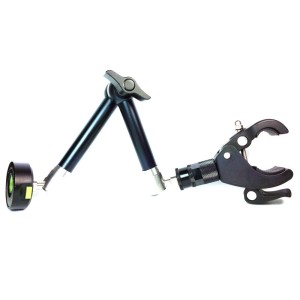
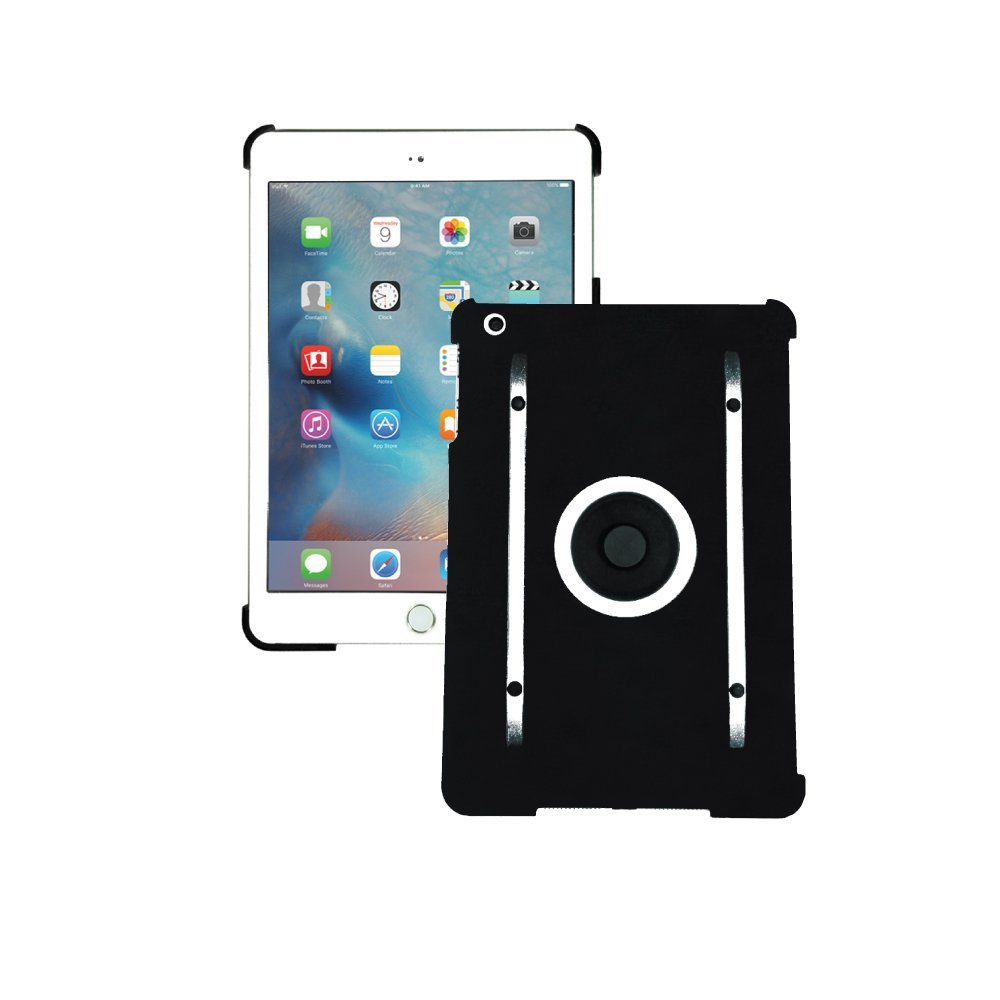
    I get this question quite a bit here and at YouTube, so I thought I’d post about it. I use two items from MYGOFLIGHT: their Flex Yoke / Universal Clamp and their iPad Kneeboard Sport which connects the iPad to the clamp (and which can also strap around your leg). Those are Amazon links if you want to go to their respective product pages. A bit pricey, but they work extremely well and are for real-world aviation, where I also use them. Highly recommended.

    51zrSZcnSkL._SL1000_51uvsJNnNHL._SL1000_

    Share this:

    • Share on X (Opens in new window) X
    • Share on Facebook (Opens in new window) Facebook
    • Email a link to a friend (Opens in new window) Email
    • Print (Opens in new window) Print
  • Well, That Was Frustrating

    2018-01-20

    |

    Uncategorized

    Thanks to those who joined for the PilotEdge event today. We had a few aircraft go out of KSUN and it was fun to see others on takeoff, and to pass one of you at the same altitude with ATC separation. I rocked my wings in case you were looking.

    But on the whole, this was a very frustrating experience in the Rift. Things started off well, even with clouds, and it was really pretty stunning from 9,500 MSL. But for some reason the Rift stopped working about half-way through. Initially I thought it was a USB issue, but I think SteamVR crashed. In trying to fix it X-Plane crashed. I reloaded from Milard to fly in to SLC from there

    koupit-pilulky.com

    , but the frames were never smooth, even when locked to 45 FPS. I killed the weather and it didn’t help. I searched for other things hitting the CPU in Lasso – MS Edge was running at some points, so lord only knows what was going on behind the scenes. But by the time I was approaching the KSLC downwind it was unusable. Total slide show. I quit it in frustration.

    In retrospect, it felt like a memory leak. Performance just slowly got worse and worse. Who knows, but thanks to those who started the flight and I hope you had a great time. When I looked there were 59 people on the network, and long streams of aircraft inbound to KSLC. It was really pretty cool and I look forward to the next one (which will be in February).

    Share this:

    • Share on X (Opens in new window) X
    • Share on Facebook (Opens in new window) Facebook
    • Email a link to a friend (Opens in new window) Email
    • Print (Opens in new window) Print
  • Fly With Me Tomorrow On PilotEdge

    2018-01-19

    |

    Uncategorized

    Tomorrow PilotEdge is getting back in the swing of monthly fly-in events with a takeover of Salt Lake City (KSLC), with directions to plan an arrival in the window of 13:00-13:30 PST. They have suggested inbound routes from Phoenix, San Francisco, and Seattle, which are also towered fields in the PilotEdge network.

    Given that these are bizjet / airliner routes, I suggested on the PE Discord server a GA / VFR flight set to arrive at the same time: Sun Valley / Haley ID (KSUN) to Salt Lake City (specifically, KSUN BYI OGD KSLC to allow for a little VOR navigation practice). In a 172 that flight should take about 1:45, and in a faster aircraft (I may be in the new JustFlight Turbo Arrow) about 1:20. This should provide some inbound traffic for runways 17/35 at KSLC , which serve the GA side of the field, and may make some of the arrival work a bit more interesting for the controllers handling all those 737s. Should be fun.

    If you’ve wanted to do a group flight together, consider joining me. I’ll probably be on the ramp at KSUN around 11:30-12:00 PST / 2:30-3:00 EST. You will need a subscription to the PilotEdge Western US Expansion to make this flight, but given its continually growing coverage, I think that’s money well spent. I will probably fly it in VR to see how well I can actually manage ForeFlight and charts while under the hood, and I might video some of the flight as well. I hope to see you there.

    Share this:

    • Share on X (Opens in new window) X
    • Share on Facebook (Opens in new window) Facebook
    • Email a link to a friend (Opens in new window) Email
    • Print (Opens in new window) Print
  • Our First Video From Inside The Oculus Rift

    2018-01-14

    |

    Videos, Virtual Reality

    I finally figured out how to capture Rift video using the Oculus Mirror tool and my NVIDIA Experience ShadowPlay feature (it’s actually quite easy, but it did take some research to figure it all out). I also shot some iPhone video up front so folks could see how I have the sensors set in my cabin, and I do two laps at night, one with HDR off and one with HDR on so you can see the difference.

    VR settings:

    • SS and AWS / Autoprojection OFF in SteamVR
    • Supersampling 1.5 in Oculus Debug
    • AWS fixed 45 FPS in Oculus Debug
    • Visual effects 4/5
    • Autogen 4/5
    • AA 2/5 No shadows, no reflections
    • 3jFPS plugin set to 46 FPS

    These reflect a change from my prior settings. I found that Oculus Debug Tool does a great job of locking the frames at 45 FPS

    Kup Lasix bez recepty

    , and this makes both the sim scenery and the Oculus movement very very smooth, especially if I have HDR turned off. As some have noted over in the Facebook VAG group the Debug Tool’s FPS lock doesn’t always seem to “take” when you first turn it on. It may have to do with having the Oculus software running first and launching from within it, but I’m not certain. Regardless, I now have the SteamVR improvement turned off in favor of those in Oculus and I like the results.

    I had fun shooting this, and I think it illustrates the quality of the experience in VR. One thing you absolutely cannot appreciate from this, though, is the experience in 3D. I’ll post more on this later, and thanks for watching.


    Share this:

    • Share on X (Opens in new window) X
    • Share on Facebook (Opens in new window) Facebook
    • Email a link to a friend (Opens in new window) Email
    • Print (Opens in new window) Print
  • VR: Beware Of 1/8/18 NVIDIA Driver

    2018-01-13

    |

    Uncategorized

    It crushed my frame rates in VR. I reverted to the prior version.

    Share this:

    • Share on X (Opens in new window) X
    • Share on Facebook (Opens in new window) Facebook
    • Email a link to a friend (Opens in new window) Email
    • Print (Opens in new window) Print
  • An Interesting Flight: Oculus, At Night, On PilotEdge

    2018-01-06

    |

    Virtual Reality

    Last night I did my first PilotEdge flight using the Oculus. I loaded the sim at Oceano, which had several people online on the ramp and one flying the pattern, with the intention of doing a few laps of the pattern and then heading north over the hills for a lap or two at San Louis Obispo. Real-world weather (scattered 9,000) and time (night). The aircraft was a Piper Cherokee (can’t remember whose, but it has a 3D cockpit that works relatively well in VR).

    This flight was interesting, for a variety of reasons. First, the headphones on the Rift come off easily with a few turns of their screw. I took them off and used my real-world aviation headset over the Rift, and that worked fine. As far as the VR experience, frames were silky smooth with no judders using the settings I’ve posted, with the exception of a few long lags where the sim was clearly dealing with data. My instinct is that I have more of these with HDR on than off, but I don’t really know. There were probably four or five of them in the course of an hour flight, and after maybe a five or 10 second delay things resumed without any difficulty.

    Regarding PilotEdge, it worked as expected. I also used my real-world kneeboard to see how it would work, and was easily able to peek under my headset at it for frequencies I’d written down and at my phone (which was running ForeFlight). As for running the radios, the Cherokee I was flying has radios that work in VR but they aren’t optimized (you don’t turn the dial with your wrist like you do in the default 172). They worked fine, but I actually powered up my FlightIllusion radio stack and used it for the radios just by feel, and it worked fine (same for the Saitek trim wheel, which is just easier to use for me rather than reaching down between my seats with the VR controller). The key thing, though, is that VR combined with PilotEdge made for an extremely realistic flight experience. Being able to easily look around the ramp and spot other aircraft moving about, and in particular, being able to see other aircraft in the pattern in 3D and hear them on the radios, was remarkably lifelike.

    So, too, was the VR experience of flight at night. The darkness of the horizon, my ability to reach up to the ceiling of the virtual cabin and turn the Cherokee’s red night light up or down and have it illuminate (or not) the entire scene, the shadows and light cast into the cabin by lights on the tarmac or passing buildings on final, the darkness of the area surrounding the strip with only its runway lights sitting in a black hole, and then my landing light illuminating the landscape on final — all of this was far more immersive in VR than it is in my physical cockpit. (One comment here: the modified lights.txt file that I’ve been using is too bright in the VR headset, so I went back to the default.)

    Same too for the sense of perspective and space. Looking at the field when turning crosswind to downwind, seeing KSBP coming up in the distance on final, checking my distance to the field on downwind – this was all extremely true to life in the VR, even at night. (Perhaps more so as you can’t see any textures.) I didn’t really need to check the map to see when I was at two mile final into KSBP as I could tell for myself based on my real-life flight experience. The motion of the airplane on takeoff and final was also more immersive in 3D VR. On final in particular I “felt” the little movements of the airplane up and down and side to side much more so than in the physical sim cockpit, especially with the crosswind I had going. These landings were much more like real landings to me.

    So all of this was really very striking. Craning my head behind me and seeing the 172 also in the pattern at Oceano, whom I had just heard make his downwind call on PilotEdge, with his landing light illuminated. Seeing that same 172 on its departure leg, with its beacon and strobes flashing in the darkness just as would in real-life, not too bright nor too dark, as I flew downwind. The shifting illumination of the cabin. The real-world ATC and radios. The movement of the simulated aircraft through space. I left the experience thinking that, for me, that 3D VR flight combined with a physical yoke, pedals, and trim wheel (and perhaps throttle, although the VR throttle works great), was absolutely a better night-pattern simulation (and for me, training exercise) than I would have gotten from the 2D world brought to life in my physical sim cockpit. If I wanted to work on my night pattern work, I’d reach for the VR headset for sure over booting my real cockpit. And the use of maps, kneeboard, and radios was not nearly as clunky as I thought it would be. A quick peek down my nose or a quick lift of the headset was all it took, and as the tech for brining apps into the VR cabin improves, this too will get easier. (And a quick note to Laminar here: please make it so we can click on a VOR or field in the X-Pad map and get its radio or runway information. You can do this in the non-VR map, and it would make things much easier in the VR cabin.)

    It will be interesting to see how long I go before flying in the physical cockpit again. VR has its issues for me. Too much time with the headset on makes my eyes a bit wonky, for one. I can’t fly with a co-pilot, for another. I expect that IFR work (with its charts) would be harder, for a third. But I rarely take long, co-pilot, or IFR flights. And for me, VR with traffic and real radio work over ortho scenery was an amazingly realistic experience. I can’t wait to do it again, and if you have the PC and GPU horsepower and are passionate about flight simulation, I think you really do need to give VR a look.

    Share this:

    • Share on X (Opens in new window) X
    • Share on Facebook (Opens in new window) Facebook
    • Email a link to a friend (Opens in new window) Email
    • Print (Opens in new window) Print
  • A Great GA Cockpit Build

    2018-01-06

    |

    Other Great Home Cockpits

    Marco has added a fabulous series of posts in the forums about his Cessna cockpit build. He clearly knows his way around a wood shop and has done some really beautiful work. Check it out.

    Share this:

    • Share on X (Opens in new window) X
    • Share on Facebook (Opens in new window) Facebook
    • Email a link to a friend (Opens in new window) Email
    • Print (Opens in new window) Print
  • The Rift Is Dialed In

    2018-01-05

    |

    Virtual Reality

    After continued testing and trial, I’ve found settings that work very well for me in the Oculus Rift, with smooth movement and no judders. Sitting at Albert Whitted near Tampa I was getting 90-100 FPS before activating VR and 45+ with it at the default KSPG airport, and 60-70/45 with the custom KSPG (which is much more taxing). Weather was set to real world, with some clouds in the area. The 45 FPS held as I flew around the Tampa area, held when I turned on WorldTraffic 3.0, and held when I went from non-HDR to HDR lighting effects. I did have more pauses and stutters after moving to HDR, though, so I will fly with it at night only. Without WT3 I don’t know that I would have had these, and I also realized my custom KTPA was loading on top of the Tampa scenery package KTPA, so the sim was managing two large airports on top of each other. But the flying was great, and I’ll be using these settings going forward. And it was really great to experience a big airport with traffic moving around in VR.

    After reading a number of posts online at the Facebook Virtual Aviation Group, I decided to run without the Oculus app running (set the Occulus app to “Run As Administrator” and it will stop loading whenever the Rift is active) and without OTT or the Oculus Debug too, and instead only use SteamVR. I figure the fewer the software layers involved the better. Here are my settings (and remember I’m running an i7 6700 clocked to about 4.6 and a 980TI also overclocked just a bit):

    • In SteamVR:
      • Developer Tab: Supersampling set to 2.0 and Advanced Supersampling Filtering ticked ON (I picked 2.0 on a lark, and don’t know how high I can go with this yet)
      • Performance Tab: Allow asynchronous reprojection and Allow interleaved reprojection ticked ON (this was important – when I turned these off I had judders galore)
    • In the X-Plane Graphics Tab:
      • Main monitor set to 1280×720 – I figured by downscaling the main monitor I’m saving processing power for the VR headset (this may or may not be the case, but I’m happy with the results)
      • Visual Effects set to middle setting (one below HDR)
      • Texture Quality set to Maximum (one below highest setting)
      • Antialiasing off (I didn’t miss it with the supersampling, although adding AA didn’t hit frames that much; when I turned on HDR visual effects I set AA to off)
      • World Objects set to High (one below max)
      • Reflection Detail at lowest setting
      • Draw Shadows On Scenery set to off
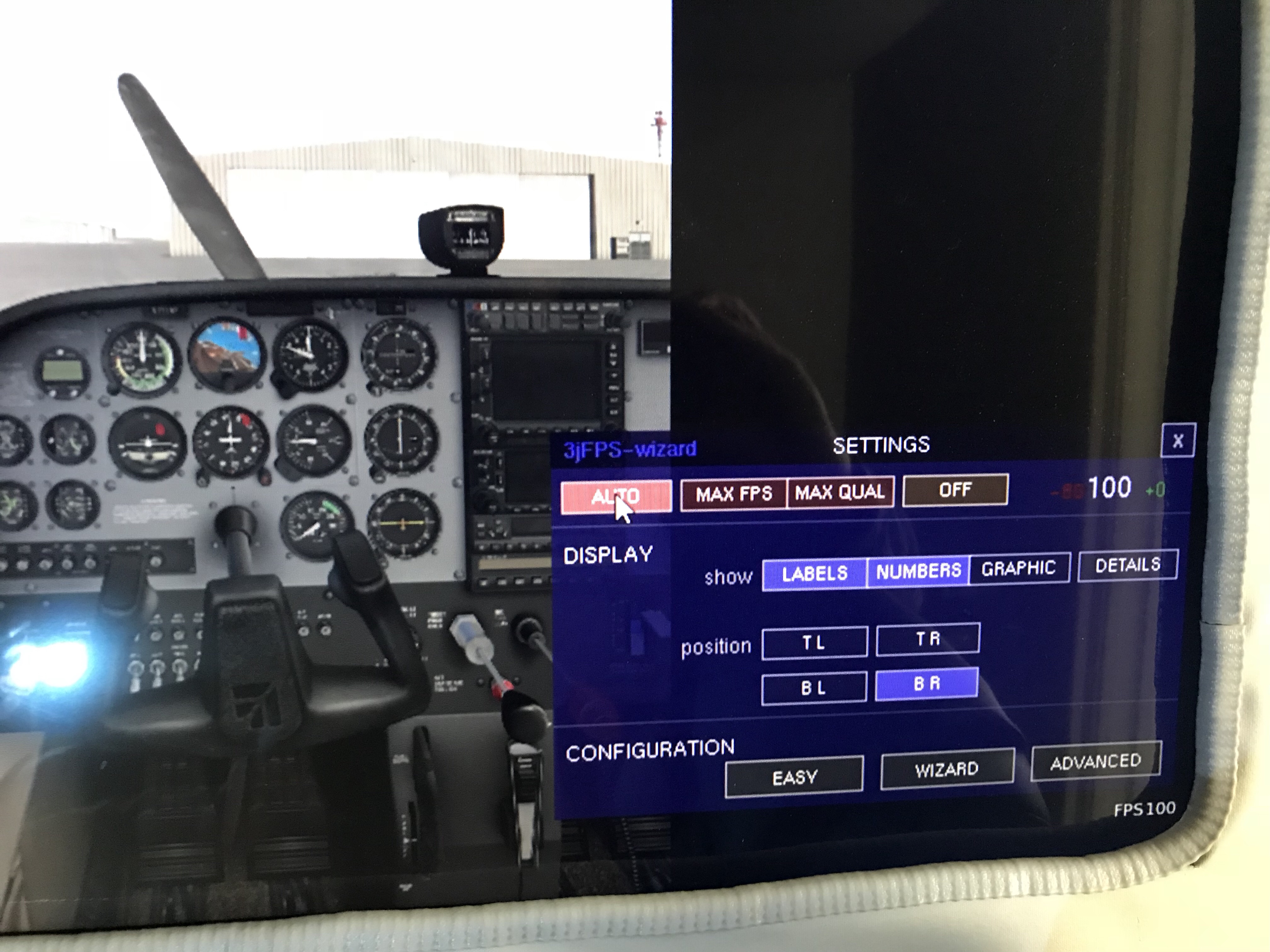
    • In the 3jFPS plugin (a must-have, in my opinion) I ran the wizard and set it to keep frames at 50, which I figure will keep me at or above 45 FPS most of the time. I still had a world full of objects even with the plugin running.

    Ironically, those settings are quite close to what I ran with in non-VR. But the important thing was that I was getting 100 FPS sitting at the default Albert Whitted, and I do believe setting the main monitor to 720p had something to do with that. The only downside was that it moved all my icons around on my desktop! Next step is to try the VR on PilotEdge …


    img_2753

    Share this:

    • Share on X (Opens in new window) X
    • Share on Facebook (Opens in new window) Facebook
    • Email a link to a friend (Opens in new window) Email
    • Print (Opens in new window) Print
Previous Page
1 … 12 13 14 15 16 … 59
Next Page

On The Glideslope

  • Instagram
  • Facebook
  • X

Loading Comments...

You must be logged in to post a comment.