On The Glideslope

  • How To
    • How I Configure For VR In X-Plane
    • How To Have Dual Controls In X-Plane
    • How To Configure X-Plane 11 For Multiple Screens
    • How To Create Custom Cameras In P3D
    • How To Get Started With X-Plane 11
  • Resources
    • Schematics
    • Center Console Plans
    • Basement Sim Video Tour
    • Screen Configurations
    • A2A LVAR List PDFs
    • How To Talk ATC
    • Cessna 172 Cabin Dimensions
    • USB u0026 Saitek
  • Reviews
  • What’s In The Sim
  • About OTG
    • About OTG
    • The Construction Journey
  • The Future Of Weather

    2016-06-11

    |

    Uncategorized

    I’ve been away from the simulator for a bit more than a week, but as always have been keeping up with the community online. Two things that got my attention this week are upcoming weather applications from REX and HiFi Technologies. Both have teaser videos online, and they look fantastic. I’m particularly excited about the prospect of real-time texture updates in Active Sky Next. Today Active Sky Next and REX Texture Direct / Soft Clouds play very well together, as ASN can inject the weather and REX can provide the textures. Folks aren’t quite certain, and you can’t tell from these videos, if these products will now compete with each other. But one thing is certain: with innovation like this simmers can only win.

    Here are the videos …

    Share this:

    • Share on X (Opens in new window) X
    • Share on Facebook (Opens in new window) Facebook
    • Email a link to a friend (Opens in new window) Email
    • Print (Opens in new window) Print
  • A Great P47 Home Cockpit

    2016-06-08

    |

    Other Great Home Cockpits

    I love this: one of my subscribers on YouTube is Patrice Gangloff, and he’s built a P47 Thunderbolt home cockpit. It’s really cool, in particular for its ceiling-mounted monitor showing the “out the top of the canopy” view. Very cool! See his YouTube channel here, and here’s a sample of his videos:

    Share this:

    • Share on X (Opens in new window) X
    • Share on Facebook (Opens in new window) Facebook
    • Email a link to a friend (Opens in new window) Email
    • Print (Opens in new window) Print
  • Monument Valley Real World

    2016-06-06

    |

    Videos

    I received a nice comment on my Monument Valley simulator tour video, and it turns out that the person who posted it, Vincent Bazillo, has done the flight in the real world. Here’s his video, and it’s remarkable how good the Orbx scenery really is. Thanks for watching, Bazillo, and good flying!

    Share this:

    • Share on X (Opens in new window) X
    • Share on Facebook (Opens in new window) Facebook
    • Email a link to a friend (Opens in new window) Email
    • Print (Opens in new window) Print
  • A Scenic Tour Of Monument Valley (By Orbx)

    2016-06-04

    |

    Videos

    A scenic tour of Monument Valley UT/AZ, this time with more narration based on a few viewer requests to hear more of what I’m doing and thinking in the sim. Happy to try that out. This flight is over the Orbx Monument Valley scenery (my first flight over it, in fact), in the A2A Cessna 172.

    As for the landing, I’m too high over the threshold (still). But working on it.

    I hope you like it, and thanks for watching.

    Share this:

    • Share on X (Opens in new window) X
    • Share on Facebook (Opens in new window) Facebook
    • Email a link to a friend (Opens in new window) Email
    • Print (Opens in new window) Print
  • Today …

    2016-06-02

    |

    Photos

    … was a beautiful day to go flying. 

    Share this:

    • Share on X (Opens in new window) X
    • Share on Facebook (Opens in new window) Facebook
    • Email a link to a friend (Opens in new window) Email
    • Print (Opens in new window) Print
  • Holy Cow! P3D V 3.3 Is Out!

    2016-06-01

    |

    Uncategorized

    The updates just keep coming. Here’s what Lockheed Martin has to say:

    Prepar3D v3.3 is available now!

    The Prepar3D v3.3 update brings several new features and numerous platform, rendering, SimDirector, SDK, and multiplayer updates – including improved rendering performance, enhanced stability and usability, an improved add-on installation process for developers, and numerous other bug fixes and improvements.

    This new release welcomes the reintroduction of Multichannel. Professional Plus licenses now have the ability to utilize the new and improved Multichannel capability to configure multiple PCs to run Prepar3D concurrently, increasing performance on multi-screen and dome setups. This groundbreaking update further expands the immersion Prepar3D can provide and unleashes the ability to use multiple machines to create a high performing immersive training setup.

    Additionally, add-on integration has been simplified for developers while also offering additional features for users, including the ability to enable and disable add-ons from within the application. Multiple monitor setups can be configured quickly using the new View Group Management window which also offers new advanced display settings including specific post processes per display that can be set up at any time. Support for Scalable Display Technologies Easy Blend™ is also included enabling multiple projected images to blend together on curved or flat surfaces. Several new usability features have also been added to SimDirector, including auto-save capability, more precise controls, and better visual cues when manipulating objects.

    The Prepar3D v3.3 update is available now and can be downloaded from your Downloads page. If you currently own a valid Prepar3D v3 license, there is no charge to update to Prepar3D v3.3.

    Prepar3D offers separate updates for the Client, Content, and Scenery. This will make updating faster and easier than ever before. Please be sure to read the Prepar3D v3 Download and Installation Directions for more details on how to quickly update to the v3.3 release. There is no update to the Scenery installer from v3.2.3.16769, so it is strongly recommended that those updating only download and install the Client and Content for this release.

    The Lockheed Martin Prepar3D team loves hearing about your experiences with Prepar3D at our Forums. The forums also give us an opportunity to listen to your feedback as we continue Prepar3D development. We’ve partnered with our forum users and with several featured developers to continue to bring added features, enhancements, and optimizations all while bringing additional backwards compatibility, bug fixes, and stability to Prepar3D v3.3.

    The full release notes are here. Can’t wait to try it out!

    Share this:

    • Share on X (Opens in new window) X
    • Share on Facebook (Opens in new window) Facebook
    • Email a link to a friend (Opens in new window) Email
    • Print (Opens in new window) Print
  • PilotEdge Alphabet Challenge Leg 6: Fullerton (KFUL) to Grand Canyon (KGCN)

    2016-06-01

    |

    The PE Alphabet Challenge

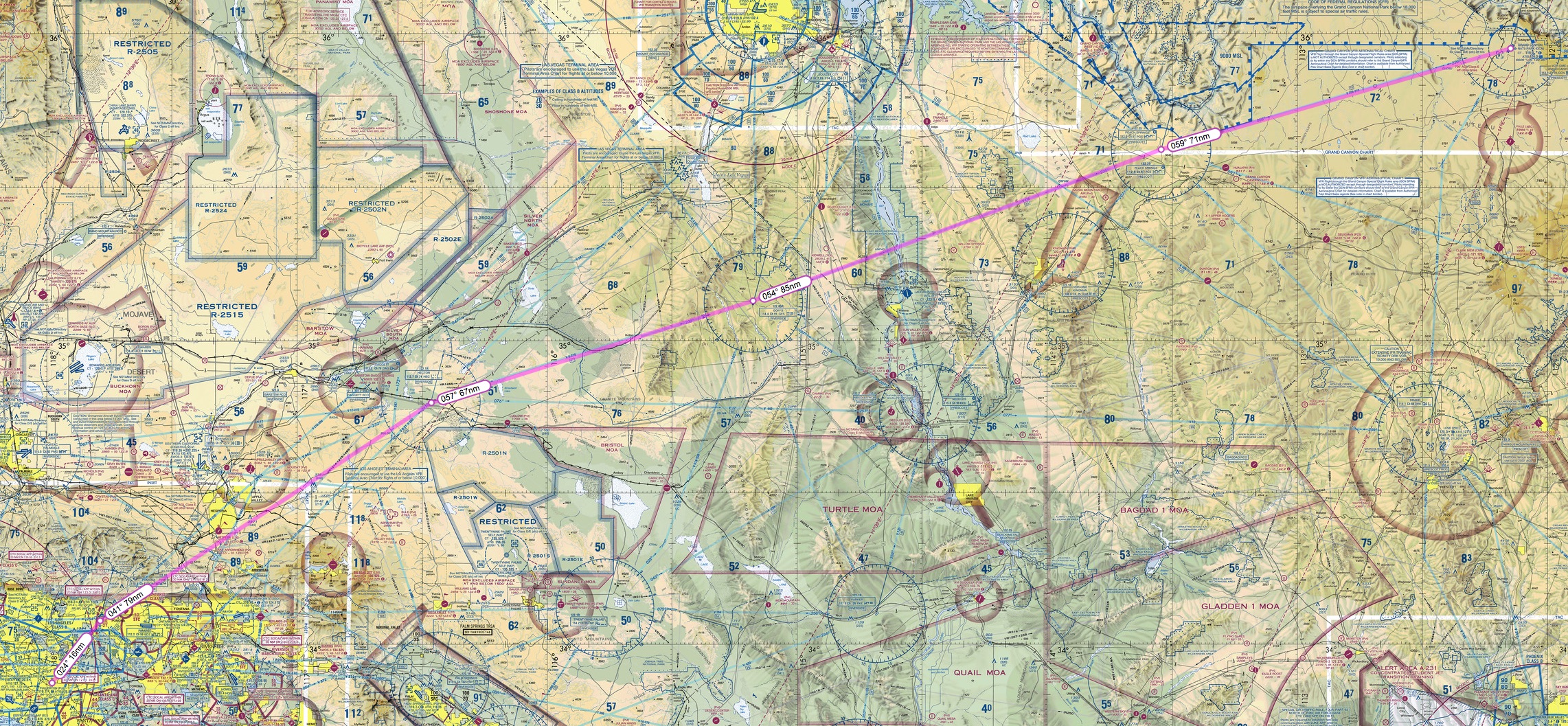
    The final PE Alphabet Challenge post for now, leg 6, “F” to “G,” which is Fullerton to Grand Canyon. This is a long hop, over 300 nautical miles and about 2 hours 25 minutes start to finish. The plan was to fly via VOR navigation at 9,500 feet via the Pomona, Hector, Goffs, and Peach Springs VORs, with no GPS and no autopilot just to make it interesting. To save some time I used the A2A Cessna 182.
    SkyVector__Flight_Planning___Aeronautical_Charts 3

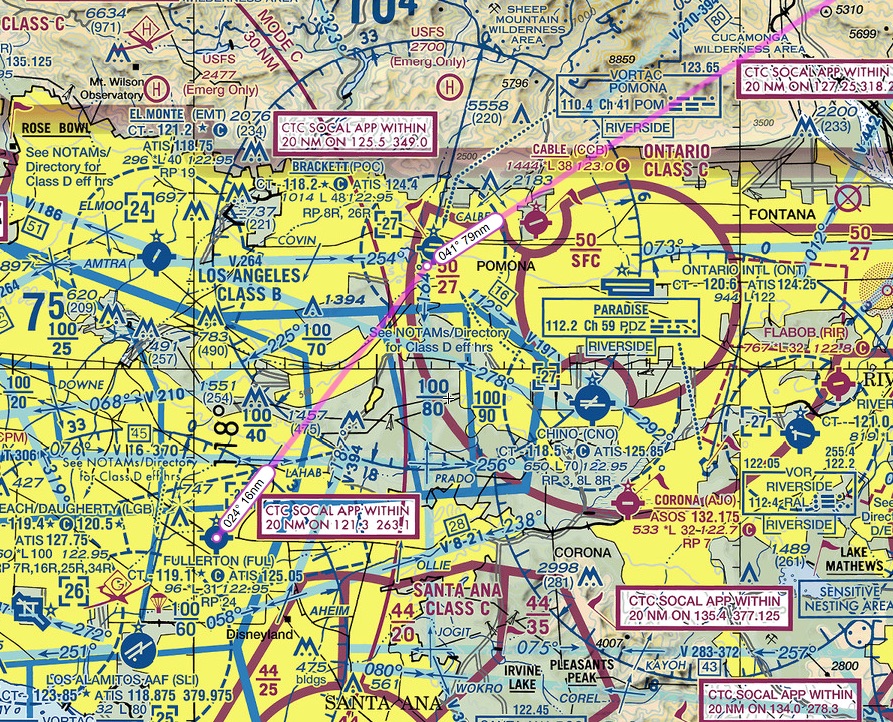
    There are at least three major VFR considerations on this flight. The first is the complex airspace departing Fullerton. As you can see below, around the Fullerton airport you have the LAX Bravo (over the top), the Los Alamitos Delta (to the SW), the Brackett Delta (on the way), and the Ontario Charlie (also on the way). One way to fly this VFR would be to make a quick right hand turn on departure, stay below the 4,000 foot LAX Bravo floor, then quickly climb over 5,000 to clear the Brackett and Ontario airspaces. Or you could do what I did, which is just request flight following and talk to ATC the entire way, letting them handle the transitions for you.
    SkyVector__Flight_Planning___Aeronautical_Charts 4

    The second VFR consideration are the numerous restricted military training and operating areas along the way. The VOR route I mapped out flies between them. And finally, you have to figure out a place to land if the engine coughs. On this route there are lots of options early, but the rest of the way you’re thinking lake bed, highway, or desert scrub.

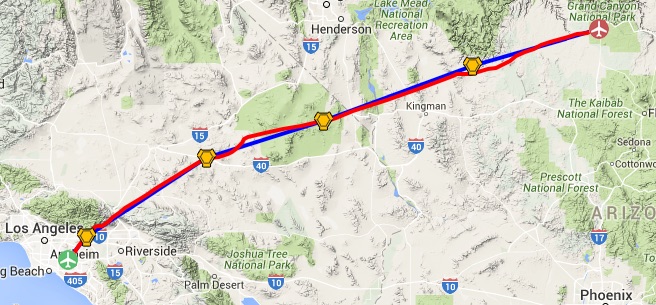
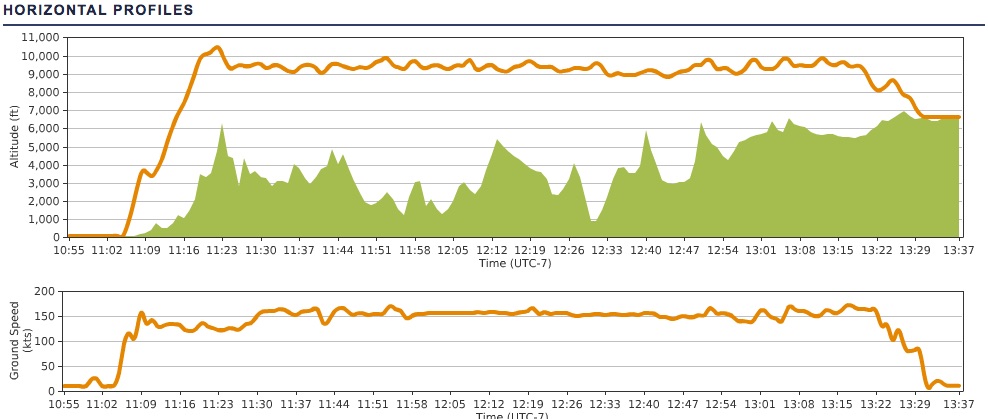
    Here’s my actual route of flight and elevation profile. One of the very fair critiques of Prepar3d as a simulator is that it’s harder to trim the aircraft in the sim than in real life. I’ve only had four flights in my real-world instruction so far, but I find this is absolutely the case. It’s almost easier to just manage the yoke continuously than count on the elevator trim to hold an altitude. You can also see the little dip early in the flight where I descended to stay out of the LAX Bravo, which I did not have permission to enter. Finally, I was not yet picking up the Grand Canyon VOR after passing Peach Springs, so I veered a bit south just to stay clear of the Grand Canyon restricted flight area.
    PEaware____N15JG_KFUL-KGCN

    PEaware____N15JG_KFUL-KGCN 2

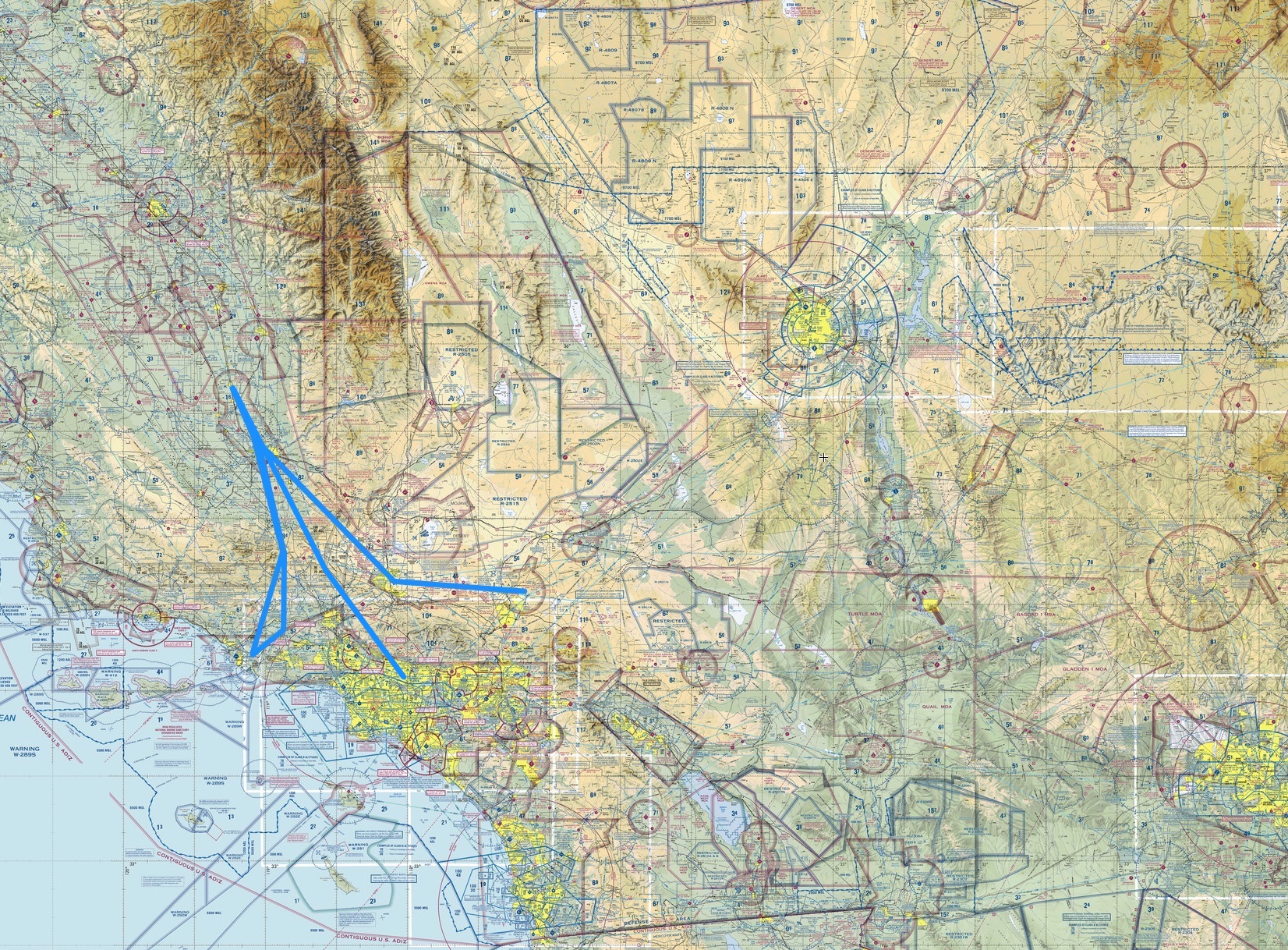
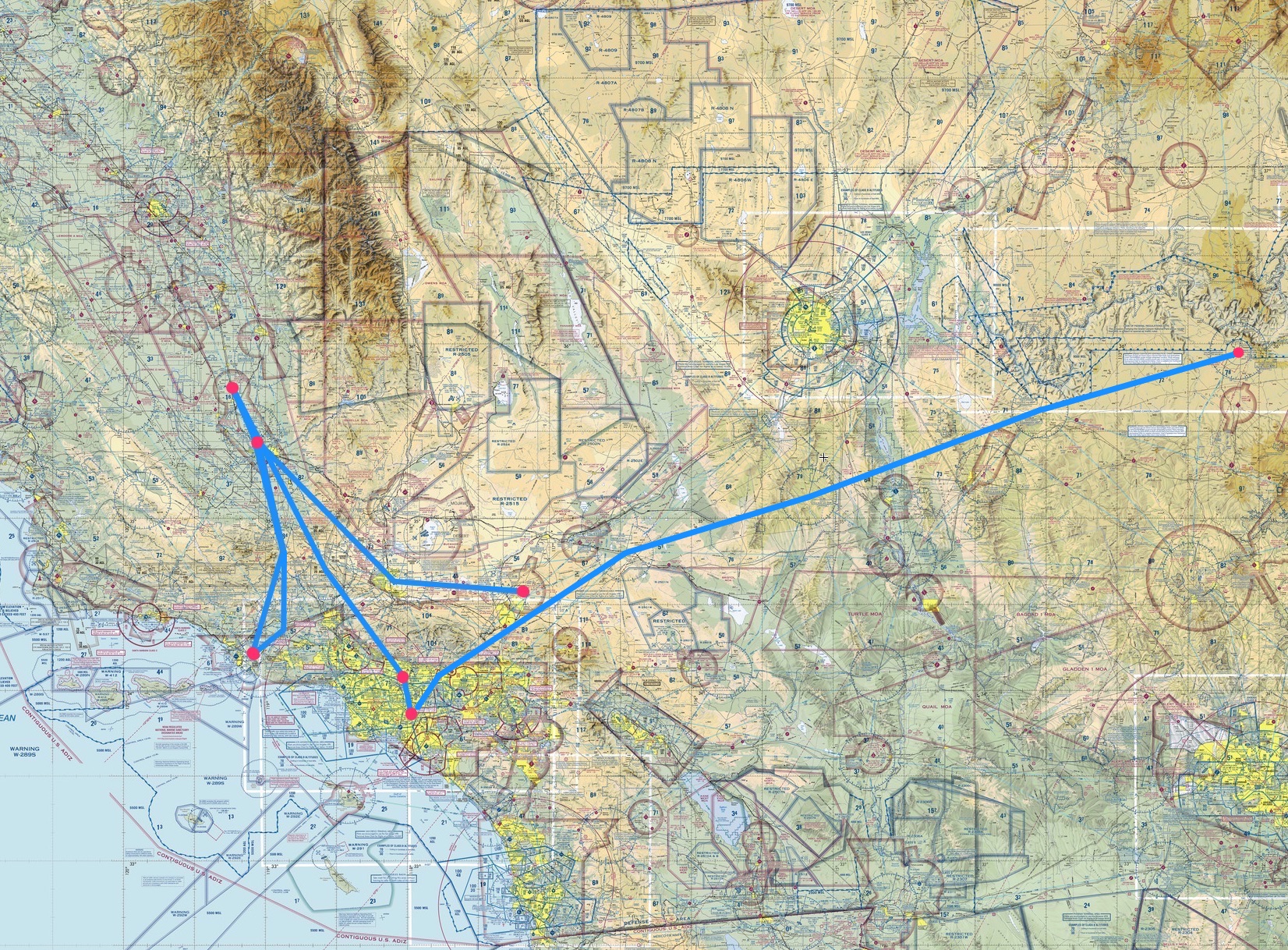
    And here’s the current Alphabet Challenge progress map to date, with legs A-F flown (you can click it to see it much larger sized):
    Alpha_Challenge_In_Progress_3

    Share this:

    • Share on X (Opens in new window) X
    • Share on Facebook (Opens in new window) Facebook
    • Email a link to a friend (Opens in new window) Email
    • Print (Opens in new window) Print
  • PE Alphabet Challenge Leg 4: Delano (KDLO) to El Monte (KEMT)

    2016-06-01

    |

    The PE Alphabet Challenge

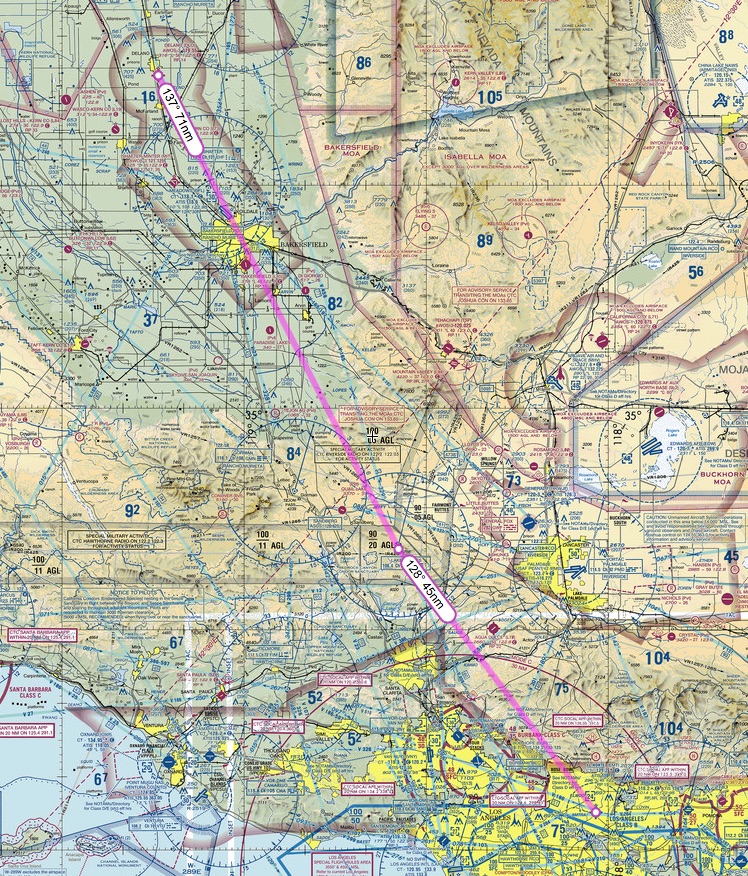
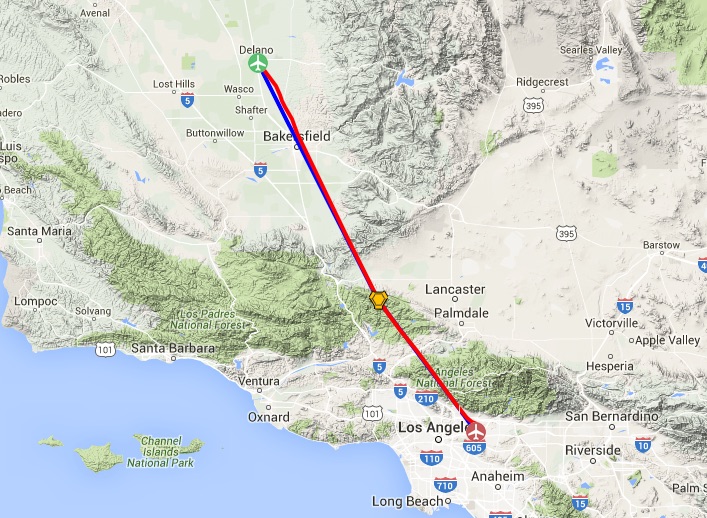
    I’m backed up on a few PE Alphabet Challenge flight posts. Here’s the leg 4, “D” to “E,” which is Delano to El Monte. The plan was to fly VFR with VOR navigation via the Lake Hughes VOR, using the A2A Cessna 172 and autopilot:

    SkyVector__Flight_Planning___Aeronautical_Charts 2

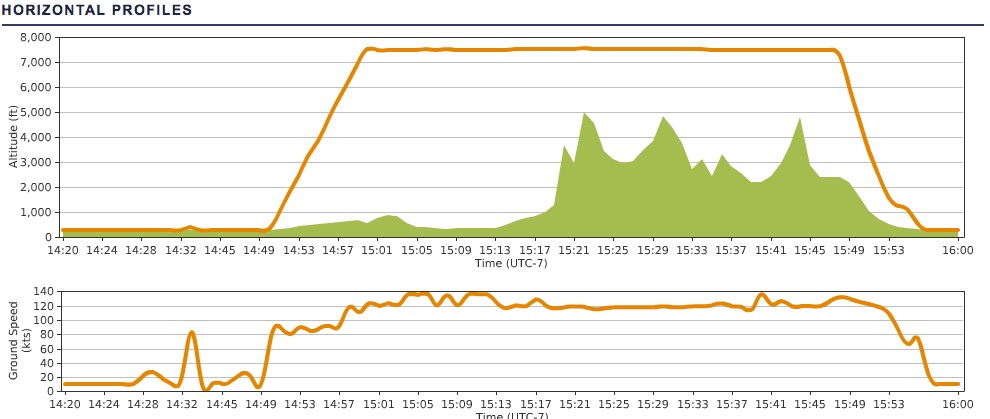
    You can see what the autopilot does in terms of nice straight vectors and altitude profile:

    PEaware____N15JG_KDLO-KEMT

    PEaware____N15JG_KDLO-KEMT 2

    Have to go up high to clear the mountains and the condor sanctuaries. Here’s the current Alphabet Challenge progress map to date, with legs A-E flown (you can click it to see it much larger sized):
    Alpha_Challenge_In_Progress 2


    Share this:

    • Share on X (Opens in new window) X
    • Share on Facebook (Opens in new window) Facebook
    • Email a link to a friend (Opens in new window) Email
    • Print (Opens in new window) Print
  • The Feeling Of Learning The Ropes

    2016-05-31

    |

    Real World Instruction

    Today was my fourth real-world flight lesson, and it was a day of slow flight, stalls (power on, power off, and turning), and pattern work. In fact I did seven takeoffs and landing today across two different fields. Today was a great experience, but I would not characterize it as “fun,” and compared to earlier lessons, today felt more like hard work. But I think this is a good thing. My instructor was definitely pushing my learning, especially with the pattern work (six routes of the pattern in about 30 minutes), and we had a nice 7-15 knot quartering crosswind to boot which introduced a whole new level of things to figure out. So I learned a couple of things today:

    • Take the time at the start of the flight to get settled. Get comfortable with your seat position etc. because the start of the flight is the only really good chance you’ll have to do this (at least in a lesson).
    • I finally got comfortable with putting the nose down when moving abeam the numbers and trimming for landing. On earlier lessons and in the first run of the pattern today when turning from downwind onto base I’d feel like I was driving the airplane downhill and it would freak me out a bit (especially at 500-700 AGL). In fact, I am driving it downhill, because it’s the only way to get down and land the sucker. But there is plenty of speed and plenty of altitude if I’m flying the pattern right, so I don’t need to let it freak me out.
    • My overall pilotage is pretty good for this point in my instruction. I made good decisions on the pattern turns (which my instructor left entirely to me) and crabbed the aircraft on final with no instruction to do so …
    • … but there is still a lot to learn about crosswind landings, and in particular, how to manage the flare. I feel like I will be learning these things for quite a while.
    • Little differences in power matter on descent. There is a real difference between 1,500, 1,400, and 1,300 RPMs. I need to find what’s best for me in how I fly the 172 to landing, and work with it. Based on today I think it’s probably 1,400.
    • Time away matters. I’ve been away from the simulator and real-world cockpits for more than a week, and I could feel my regression. I’m assuming this will feel less pronounced as the routines of flying the airplane become more automatic (it was the ground work where I felt most behind the curve), but staying current clearly matters while I’m learning.
    • MOST IMPORTANT: Building new skills takes time, and when you’re really practicing deliberately, it feels like hard work. There’s a bunch of research about deliberate practice and how it builds expertise, and I’ve read a good portion of it, and today’s practice was definitely deliberate. It had many repetitions, was designed by a professional, had immediate feedback, was difficult and tiring, and frankly not a ton of fun in a traditional sense. But I feel like I learned a ton, and that’s the point.

    Share this:

    • Share on X (Opens in new window) X
    • Share on Facebook (Opens in new window) Facebook
    • Email a link to a friend (Opens in new window) Email
    • Print (Opens in new window) Print
  • Video: El Monte To Fullerton On PilotEdge

    2016-05-30

    |

    PilotEdge, The PE Alphabet Challenge, Videos

    I’ve been away from the simulator for a week traveling, but before I hit the road I videoed leg four of the PilotEdge Alphabet Challenge, El Monte to Fullerton. It’s only about a 10 minute flight, so I recorded it in its entirety as a way of giving folks who may be unfamiliar with PilotEdge a sense of what a simple VFR flight on the network is like. It also showcases the Orbx SoCal scenery, which is fantastic. I hope you like it (rough landing and all).

    Share this:

    • Share on X (Opens in new window) X
    • Share on Facebook (Opens in new window) Facebook
    • Email a link to a friend (Opens in new window) Email
    • Print (Opens in new window) Print
Previous Page
1 … 50 51 52 53 54 … 59
Next Page

On The Glideslope

  • Instagram
  • Facebook
  • X

Loading Comments...

You must be logged in to post a comment.