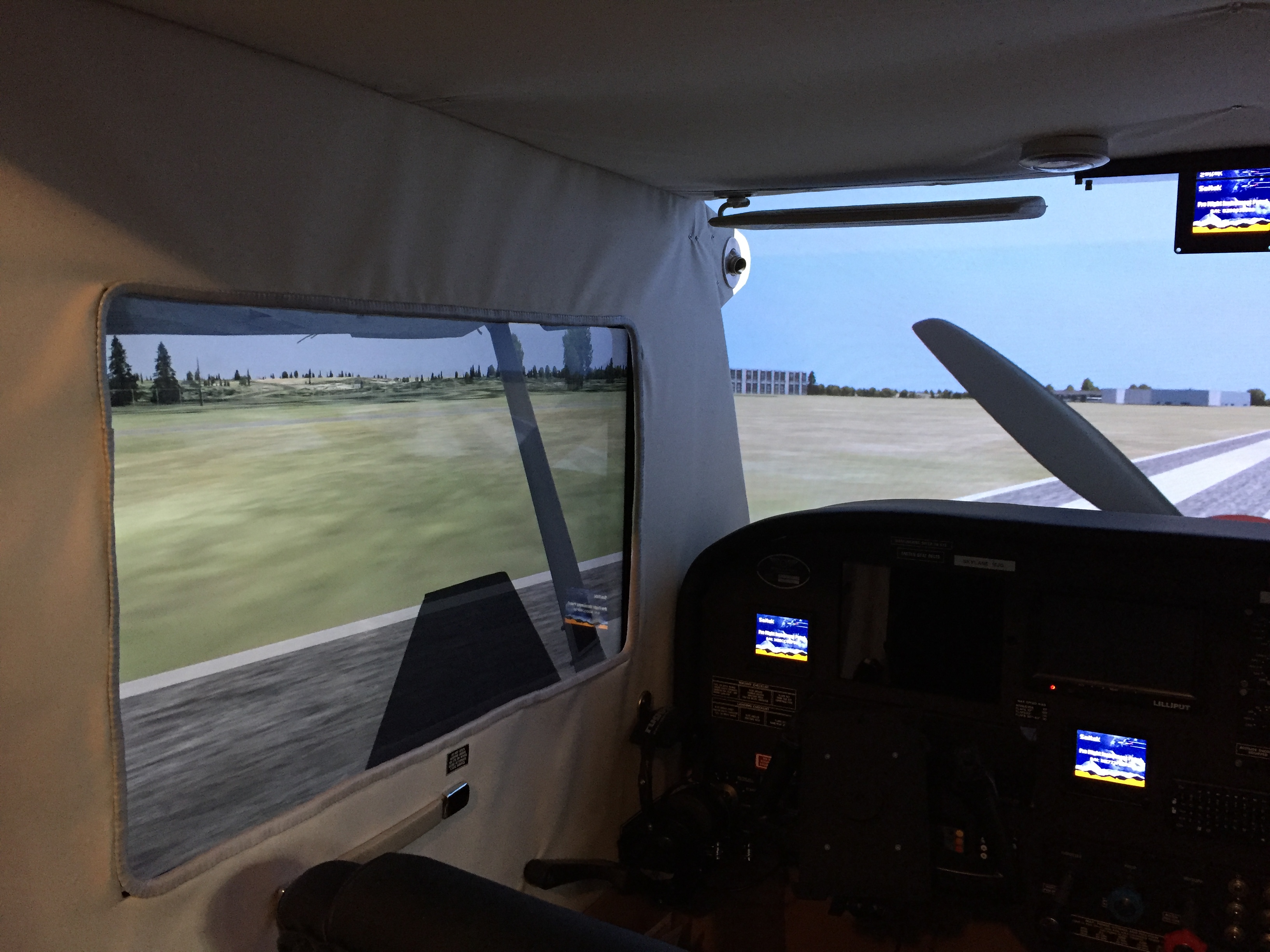
Many of the questions I get on my YouTube channel are about my screen setup and how I manage to get the images on the projector and side screens to align. I do it through custom cameras created using the custom camera tool in Prepar3d, and thought it might be helpful if I wrote a post here explaining my process.

There are two ways you can use custom cameras in P3D. One is to create new camera views in a particular scenario. These will be saved in the scenario config file (which is stored in the P3D folder in your PC’s Documents folder), and they will be persistent with that scenario: whenever you load it, those camera views will be listed as options in the Custom Camera submenu of the View menu at the top of the screen. If you save custom cameras in your default scenario, they will remain there, too. The other is by adding them to an airplane’s default configuration file, in which case that camera view will always be available for any scenario or flight with that airplane. That’s a bit more complicated. I’ll describe both here.

Creating custom views is easy but not always intuitive, and through (much, much) trial and error, I’ve learned ways to simplify the process and get good alignment across multiple screens. Here’s my process for setting up a new set of screen views, which for me would involve three cameras: Front (for the projection screen and view out the front of the aircraft), Left (for the view out the left window), and Right (same for the right window).

FIRST: I begin with the front view, because it’s the front horizon that I will want the side views to match up with. Custom cameras inherit the settings of the view from which they start, so to save time I first use the view directional keyboard commands to move the view to something close to what I want to have (forward / back, left / right, up / down). It’s easier to tweak a view that’s sort of close than to start completely from scratch.

SECOND: I right click on the front view select “Custom Camera / Create New” from the popup menu:
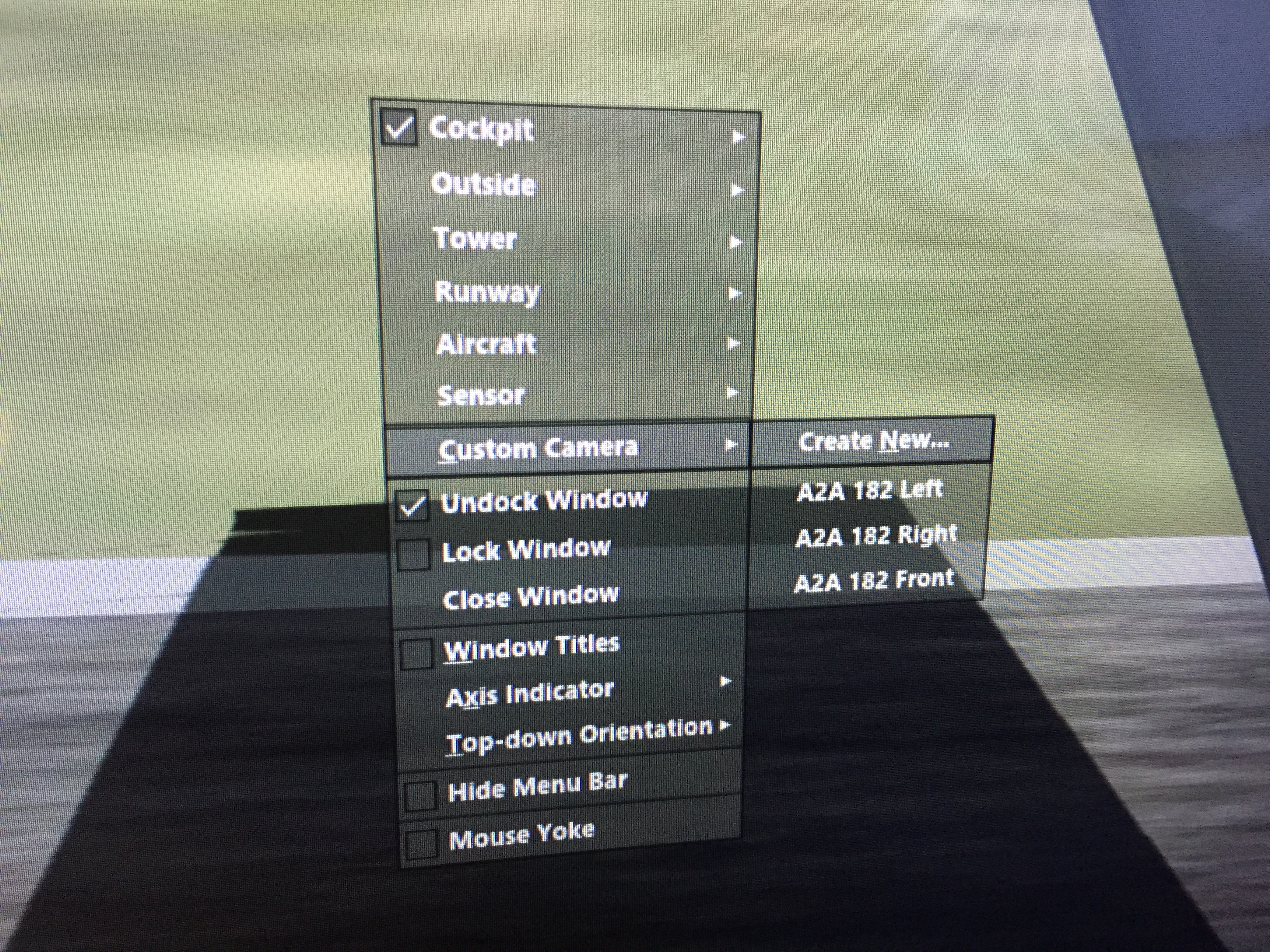
Photo May 15, 8 53 57 AM

This brings up the Manage Camera Views screen:
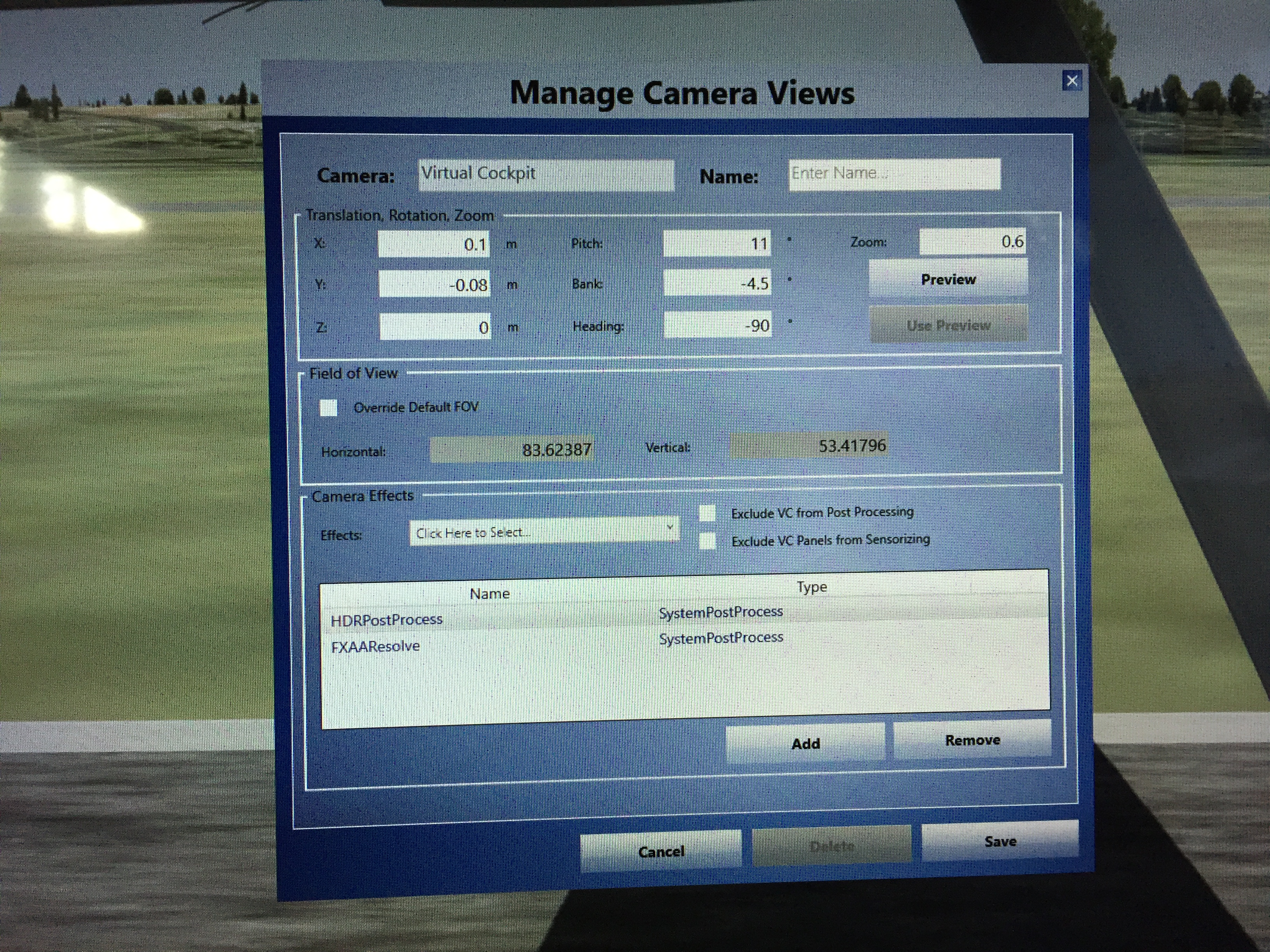
Photo May 15, 8 54 29 AM

THIRD: I tweak that view to get it to my liking, and the easiest way to do this is to use previews. Click the Preview button, and it will open a new view window on the main screen that has inherited the view from which you clicked. Drag the window and its edges so it fills the front view screen. From now on any changes that you make to the variables in the Manage Camera Views dialogue will show instantly on that view screen when you click the Preview button. So you can easily tweak, preview, tweak, preview, etc.

As for the variables in the dialogue, here’s what they mean:

  • X is the placement of the eye point left or right of center in the aircraft
  • Y is the placement of the eye point above or below center in the aircraft
  • Z is the placement of the eye point front or back of center in the aircraft
  • Pitch is how “nose up” or “nose down” the view is
  • Bank is how angled left or angled right the view is
  • Heading is how turned to the left or turned to the right the view is

Tweak these settings until the view is how you like it, then give it a name in the dialog and click “Save.” P3D will then ask you if you want to quit or not. If you choose “Yes” the dialog will close as will the preview window, but a view with that name will now appear in the Custom Camera pop-up menu, and you can select it for your front view. With my front view is that I like to see the cowling of the aircraft, but not the glare shield (as my sim has one). This means my front view is pushed forward quite a bit along the Z axis, and yours may be different.

FOURTH: Once the front view is created, I make a left-hand view for the left window monitor. I follow the same process as above, using the keyboard keys to turn the view to the left, move it close to the window, adjust the height, etc. Again, I’m just trying to get it close. Once it is, I open the Manage Camera Views dialogue, create a preview, drag it over to the left window monitor, fill the screen, and begin tweaking the preview. One variable that I simply set rather than tweak is the Heading variable. For the Left view I set it to -90, as this has me looking directly out the left side of the aircraft.

Through trial and error I’ve learned two things are important with the side views. The first is that at least for me, the side views and front view need different zoom settings. My sim is really close to the projection screen, and it’s a 100-inch screen. To keep objects from being huge I have the front zoom at .30. For objects on the side views to be about the same size they need a greater zoom, and I use .60. I’ve come to this through trial and error, and in my sim this has things like the buildings and taxiway lines matching up well from a size perspective. Your zoom settings will be different, but know that the front and side views may need different zooms. The second is that the Bank variable is important. The default camera views nearly always have the horizon when viewed out the side window tilted toward the front or rear of the aircraft. I use the Bank variable to adjust the tilt to make the horizon straight, and the Pitch variable to adjust the height of the horizon so it lines up with the horizon of the front view across the two screens. This may take some trial and error, and might mean re-tweaking the front view’s Pitch a bit, but when it’s dialed in I can (1) see the cowling of the aircraft out the front, (2) see the bottom of the wing and my flaps out the side, and (3) have the horizon match up across both left and front screens.

When I have the left view correct I save it with the name “Left,” and instead of quitting the Manage Camera Views dialogue I click “No” because I want to continue with the next view: Right.

FIFTH: Once I have my Left view I do NOT close the Manage Camera Views dialogue. Instead, I rename the view Right, and keep all the variables THE SAME except three: X, Bank, and Heading. Bank and Heading are easy: just make them the inverse version of the Left value (so if the Bank and Heading were -4.5 and -90 for left, they should be 4.5 and 90 for right). Y, Z, Pitch, and Zoom should stay the same. This ensures your Left and Right views are mirror compliments of each other. The only variable to tweak is X, as it’s how far left or right of center the eye point is. For the Right view you’ll want it up close to the right window, so I tweak that variable, looking for a point where the both the left and right struts (or wings for a low-wing airplane) seem about the same size and position. Then I save that view as “Right” and close the dialogue.

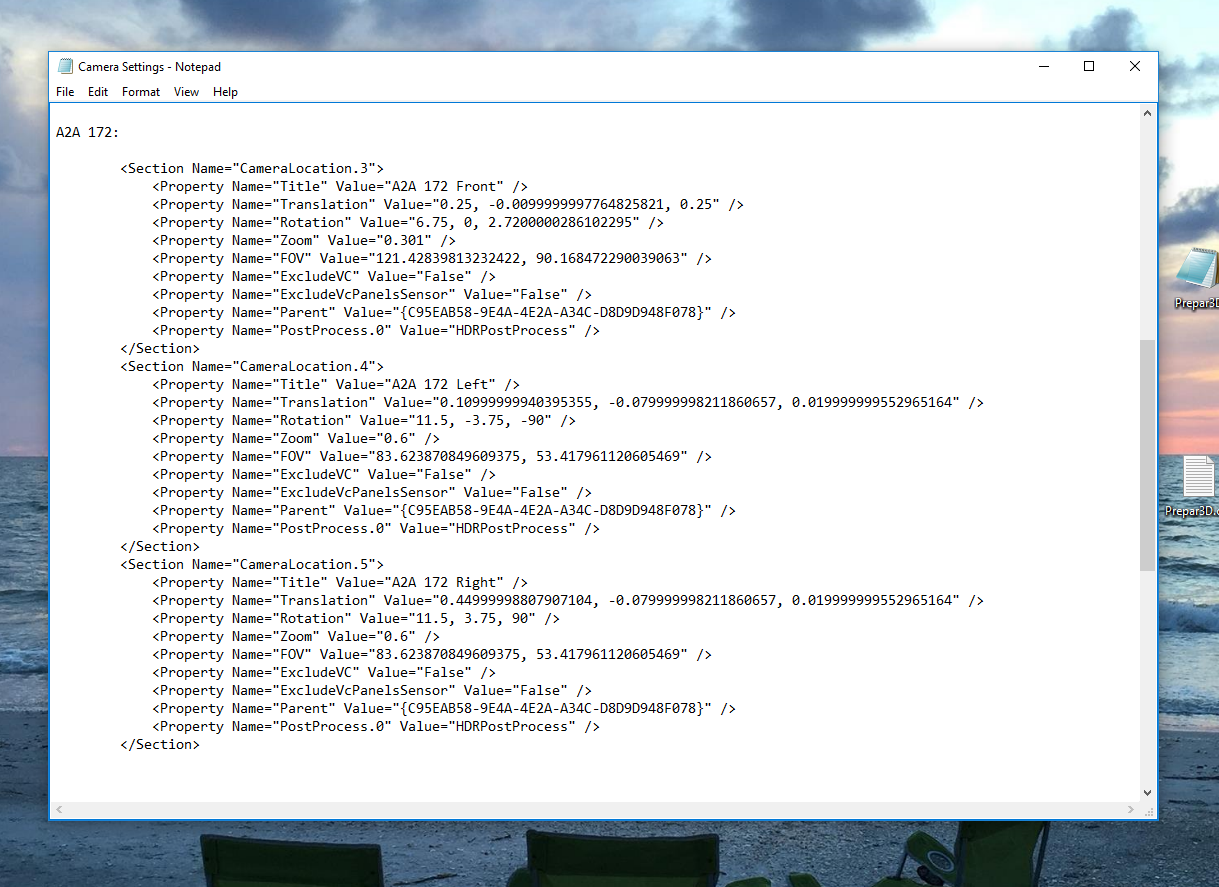
At this point you should have three saved camera views, Front, Left, and Right, and you can assign them to their respective views and monitors. Now the question is how to keep them for use in other flights. I have two ways of doing this. First, and easiest, is to add the camera views you’ve defined to other saved scenarios. To make this easy (and to back up my work) I’ve created a text file on my desktop called “Cameras” into which I’ve pasted my camera settings so they are backed up and easily at hand. This is easy to do: go into the Documents/Preapar3d folder on your PC and open in a text editor the scenario .CFG file in which you created your custom views. Scroll down and you will see the standard camera views, and below that your custom ones. Just copy and paste the code into your backup Cameras file. Here’s a screen shot of part of mine:
Screenshot 2016-05-18 15.42.17

I have camera setups for four aircraft: the Carenado 182, A2A 182, A2A 172, and A2A Piper 180. All are pasted into this backup file so I have them. Then I can copy and paste the appropriate camera code into the config file of any particular scenario without having to create the camera views via the dialogues. Just open the scenario config file in a text editor and add the appropriate camera code at the bottom of the pre-existing camera locations. Just be sure to continue numbering the camera setups consecutively within the file.

You might also want your camera setups to be part of a default aircraft configuration, so those views are available whenever you start a flight with a particular aircraft (saved scenario or not). This is a little more complicated, but not much so. Let’s say I want to add my the A2A 172 Front / Left / Right camera setups to the default A2A 172 so they are always available whenever I use that aircraft. To do this I would go into my P3D directory / simobjects / airplanes / A2A 172 subdirectory and open the airplane .CFG file in a text editor. If you scroll down in an airplane .CFG file you will find the camera definitions, and they look like this:
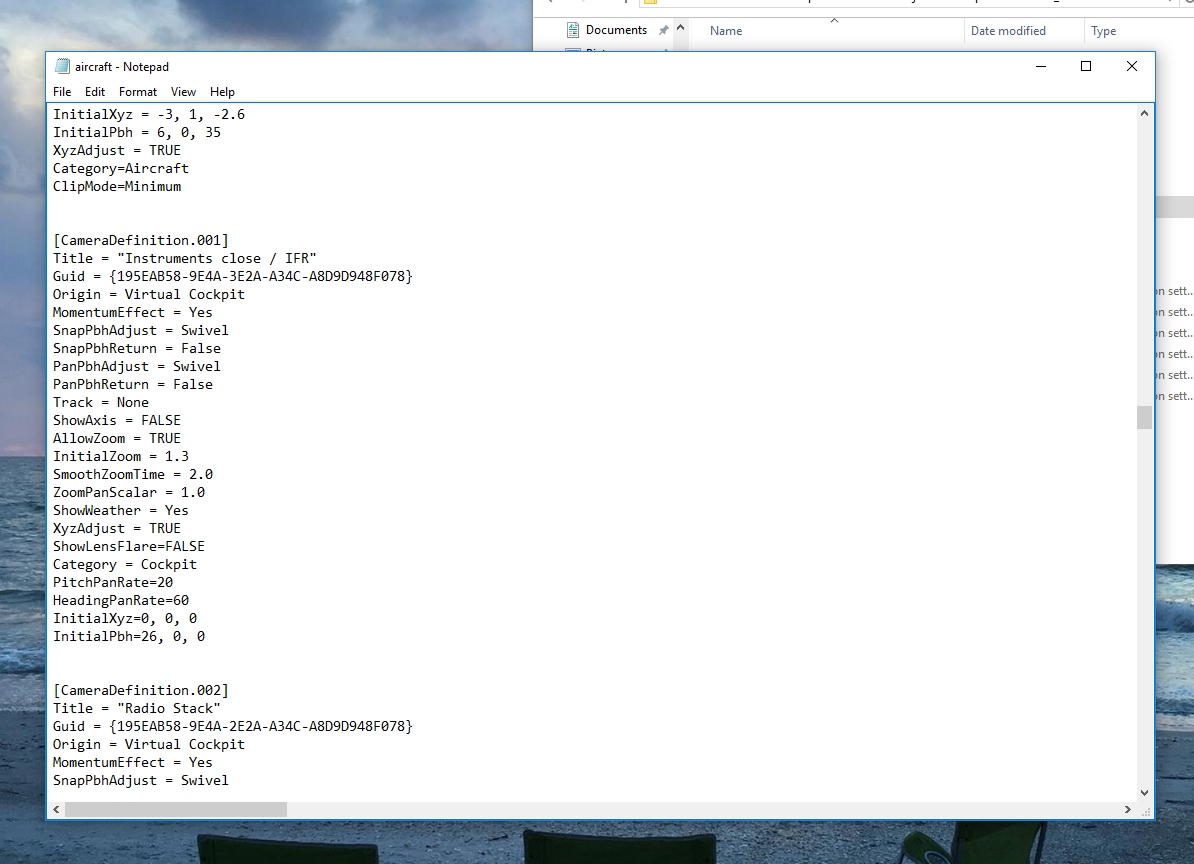
Screenshot 2016-05-18 15.43.43

As you can see, these look DIFFERENT than the scenario camera definitions, which is where people get confused. The good news is that there are only a few lines of code that you need to change to convert one of these default views into a custom camera view. Here’s how to do it.

  • First, copy an existing camera definition within the airplane .CFG file. It doesn’t matter which one.
  • Second, paste it at the end of the camera definitions, and give it a new cameradefinition number that is next in the sequence from the definition above it.
  • Third, change the Title variable of the view to the name you want (e.g, “A2A 172 Front”).
  • Fourth, change the InitialZoom variable to be the correct zoom for your custom camera.
  • Fifth, change the InitialXyz line to reflect the X Y Z values from your custom camera.
  • Fifth, change the InitialPbh line to reflect the Pitch, Bank, and Heading values from your custom camera.
  • Sixth, and last, go to www.guidgenerator.com  and grab a GUID number. Each camera needs a unique identifier, and this site will give you one. Paste it OVER the GUID value between the brackets at the top of the camera definition. When you’re done, it should look something like this:
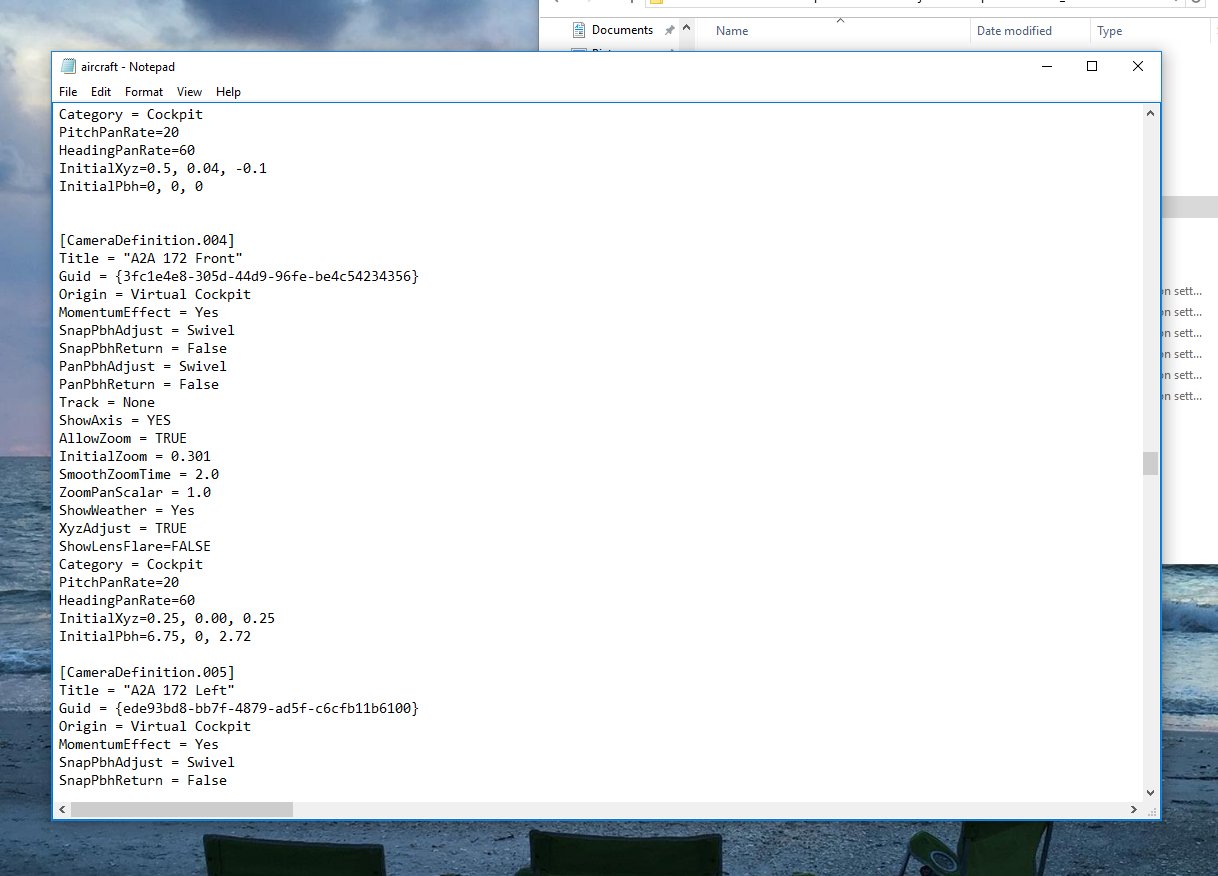
Screenshot 2016-05-18 15.44.08

Save the file. That’s it, unless you want to add Left, Right, or other views, in which case you can repeat the process.

In terms of having this all look good from a REAL camera’s perspective if you’re filming with a GoPro etc., what I’ve learned is key is that the camera be at about the same height as your eyes in your simpit. Then everything should line up across the three monitors as they do from where you sit (with some minor variability).

I hope this is helpful.


256 responses to “How To: Creating Custom Cameras In Prepar3d V3 (Especially For Three-Monitor Setups)”

  1. Charlie K Avatar
    Charlie K

    Any way to do this so that the cameras are also loaded and open with an aircraft, rather than just having the cameras available in the menu?

    1. N15JG Avatar
      N15JG

      Hi CK. Yes, if you have the camera views saved in a scenario, whenever you open that scenario all windows and views will be as you left them. So I have a default starting scenario for each aircraft I fly, with the location set to whichever field I most often fly that aircraft out of. I load the scenario and then move to a new airport if I want to change location.

  2. Trent Avatar
    Trent

    Hi I might have missed something, in your front view the nose cone and propeller remain fixed my moves with the G force of the throttle input, is there a way to stop this, Kindest Regards

    1. N15JG Avatar
      N15JG

      In the Prepar3d.cfg file there is are a few lines of settings for “Dynamic Head Movement.” Set them all to 0 and you’ll stop seeing the G effects. Hope this helps!

      1. Trent Bishop Avatar
        Trent Bishop

        Thank-you so much greatly Appreciated!!!

        1. N15JG Avatar
          N15JG

          My pleasure. Hope it helps.

  3. JWS Avatar
    JWS

    Setting X parameter for the Right view is a point of discussion I believe. You’ve chosen to make the eye point close to the right window, which is great for the person sitting next to you, but from your perspective it’s wrong (IMHO). So you should have 2 scenario’s, one when you’re alone in your cockpit and one when you have a friend joining you on the right hand seat. In the last case you should use the setting described above..

    1. N15JG Avatar
      N15JG

      Thanks for the comment. Actually, from my perspective in the left seat the right window looks great. For both left and right my camera positions are set so that the horizon and runway stripes align with the front view, and so that I see the view I would see out a window (meaning I see none of the virtual cockpit). They look very good from left and right seat in the sim, but others’ mileage may vary.

  4. Chas Reed Avatar

    Love your stuff!

    Thank you very much for your explanation.

    I use TrackIR. Maybe I missed it, but when I create camera views, I stretch the view across my three screens then hit Alt/Return twice. This gives me 3 full screen with TrackIR Active across all three screens… The deficit is that the side screens are stretched and therefore distorted.

    When I try to create screens as you have done here , undock and move the screen to its proper position, and , I get what I want with a TRACKIR-Active center screen, but the side screens are no longer TrackIR active, rather non-moving and fixed.

    I know you don’t use TrackIR, but you appear to know more about multiple screens then I do; having just gone that way in the last couple of months..

    Any suggestions to UNDOCK views, move them to where they belong, and still retain my “TrackIR-ness” across all three?

    Thoroughly enjoy your flights and try to duplicate each one !

    Chas

    1. N15JG Avatar
      N15JG

      Hi Chas. I don’t know if TrackIR will work on multiple screens or not. Maybe check their forums?

  5. Francisco Avatar
    Francisco

    Hi, I have seen your work on youtube, congrants, it’s pretty amazing. I have one question, How did you connect the GTN650 gps with the simulator so that it can show current position?

    1. N15JG Avatar
      N15JG

      Thank you! It’s the GTN750 add on flight Flight1 software. It simulates the real thing and I’m running it on a small touch screw monitor and it connects automatically to any airplane in the sim in which you install it. The add on was pricey, but I use it all the time.

  6. AVIV KEDEM Avatar
    AVIV KEDEM

    HI. every time I am opening a new view my fps drop by half’. How did you using 3 monitors and stil get 30 fps?

    1. N15JG Avatar
      N15JG

      A powerful CPU and GPU are the key. With one window my frame rates are 100-110. Every new window I undock they drop a bit more, but not by half. If I have the frames externally limited by NVIDIA Inspector they do, though. So I have my screens set to refresh at 30 hrz, and in P3D I have frames set to unlimited with VSync set to on with triple buffering.

      1. David Avatar
        David

        Hi N15JG!

        First of all, congratulations for your cockpit and your job sharing it. Because I love your cockpit, I have just built one very similar, and now is time for screens configuration. Although I’m following your configuration, my NVIDIA shows the screen dark (during try time) if I chose 30 hrz.
        Did you change the resolution of the monitors?
        Did you notice improvement changing from 60 hrz?
        Do you have any problem abaut quality visualization in 30 hrz?

        Thank you so much
        David

  7. Steve Avatar
    Steve

    Hi, good work!
    When you need to look out the right window in your sim, in a left traffic pattern, to view a landing runway while on downwind, normally you would try to have the airplane positioned at about a 45 degree angle looking back towards the runway numbers as a reference to know when to begin turning to base-leg. (sorry the long sentence).. How does your setup workout in that scenario? As a private pilot, I know you will know what I’m talking about… Others reading this may be confused without diagrams. From what I’ve noticed, in your vids., it looks like your screens are actually a little bigger than the sim-window-opening, allowing you to lean forward, for example, to see around your pillars between the front and side windows. Are you able to look back at the runway touch-down point after having passed it on downwind, approaching turn-to-base?
    Hope that makes sense.. Steve

    1. N15JG Avatar
      N15JG

      Hi Steve. Thanks for your comment and question. The short answer is, “I guess.” You’re right, I can’t see the field at 45 degrees behind me. But I know that in the real world I should be thinking base turn about 45 seconds to a minute after being abeam the numbers, so that’s what I do (or when I’m somewhere around 700 AGL, but I tend to guess based on the feel of the time passed than the altimeter).

    2. Bettie Avatar

      And I thought I was the sensible one. Thanks for setting me stathgir.

  8. Steve Avatar
    Steve

    Thanks!
    Correction, I said right window, when I meant left. I like your setup and I’m considering fiddling with mine (again) giving the projector another go. Besides the method you gave for base turn timing, I suppose one could just use the hat switch for a quick look back at the field.

    1. N15JG Avatar
      N15JG

      Indeed, but the view won’t necessarily go back to exactly where it was. You could use EXDoc I suppose to quickly switch views …

  9.  Avatar
    Anonymous

    Great tutorial on saving Windows.
    Worked perfect.
    Thank you,
    Tom

    1. N15JG Avatar
      N15JG

      Great, Tom. I’m glad to hear it and many thanks.

    2. Chas Avatar
      Chas

      I believe you mean saving Cameras…saving windows, tho that is exactly what you are doing, is less informative to noobies,I think.

      Regards,
      Chas

  10. Amro Avatar

    Great work.
    Well done. Also I really appreciate the fact that you always respond to people in a sincere way.
    I want to increase my frame rate as you suggested by lowering my refresh rate to 30, but my monitor dosn’t have any lower refresh rate than 60.
    How to I reduce my monitor refresh rate to 30.

    Thanks

    1. N15JG Avatar
      N15JG

      Thanks Amro for the kind words. Mine didn’t have a native refresh of 30 hrz either, but I was able to create one in the NVIDIA Control Center app. It has a custom resolution option, which includes refresh rates. At least in my version it does. A quick Google of that will probably bring up a solid how-to.

  11.  Avatar
    Anonymous

    My Nvidia I have an option called adaptive v-sync in there I had three options one of them said to limit the refresh rate to half. . I tried that. And I think it did give me some extra frames. I would have to do much more research and see whether this will work. Thank you for your feedback.

    1. N15JG Avatar
      N15JG

      I did that until I figured out how to change the rate on the screens and it worked well. But you also need to them limit the sim to 30 fps in the sim settings, so be sure to do that, too.

    2. Chas Reed Avatar

      I am trying this out tonite on my PilotEdge Alphabet Challenge #12…then decided to go ahead and put myself, my Tail Number and VCplackard.. 0n and in in my Lancair Legacy V2….then I am doing your N. Carolina mountain tour…..Lovin your vids!
      Chas

      1. N15JG Avatar
        N15JG

        Awesome! Also Chas, I removed my name just because I like my anonymity. Enjoy your flight. Those mountain strip should be exciting in the Lancair!

        1. Chas Reed Avatar

          Goth have re the name…sorry

          Chas

          1. N15JG Avatar
            N15JG

            No problem. How were the flights?

  12. Amro Avatar

    While tweaking my nvidia setting in the nvida control panel, I thought lets start fresh so I have reset it.
    It seems that this was a very bad idea, as when I went back to my P3d v3.3 the water texture became very cartoonish and the slider in the P3D setting is shaded.
    Any ideas

    1. N15JG Avatar
      N15JG

      First delete the contents of your shaders folder in the Prepar3d file structure so it can rebuild the next time you load P3D. If you’re not sure how to do this a quick Google search will inform you. Be sure to give the scenery time to load on P3D scenario boot – sometimes it takes a few minutes to redraw everything fresh. If that doesn’t work delete your P3D .cfg file and let it rebuild itself. These two things almost always fix any scenery problems I might have.

      1. Amro Avatar

        Thanks. That worked. Dont know which part did, but it worked.

  13. Tommy Avatar
    Tommy

    Hello Again,

    Thank you again for all the work that you are doing to assist so many of us.

    I am having a dilemma with the GTN.

    I have been running P3D now for awhile with 60+FPS. After seeing your awesome simulator, I decided to dig out one of the iPad’s that I haven’t been using and see if I could put my GTN 750 on it. Well, all seemed fine, I pop out the 750, undock it, and as I drag it to my iPad, it causes P3D to totally crash. I can drag items to the iPad and use the there with no problem, so the APP is working as designed, I think P3D just does not like it. I tried running the App as Admin, with same results.

    Had you experienced anything like that when you were setting up your sim? Or possibly, could it be the fact that I am using an APP to do it? (twomonusb)

    Thanks again for all you are doing for our hobby.

    Tommy

    1. N15JG Avatar
      N15JG

      Thanks, Tommy for your kind words. Candidly, I never had any luck with the “use your iPad as a monitor” apps. They’d crash or be laggy or any number of things. I finally ditched the idea and spent the money for a small touch screen monitor, and it’s worked seamlessly. I do use an iPad with the sim, running instruments on it with native iPad apps, and those work great. But not so much as an extended monitor, at least for me.

  14. Smythinson Avatar
    Smythinson

    Hello N15JG,

    I would like to know what type of projector screen you went with. I currently have a roll up screen, but the quality of the image from my brand new Optoma 320UST is not the best quality. I am wondering if this is because the screen has some years on it and the reflective material is wearing out and also because the screen is not stretched tight.

    Great Job on your sim and all of the information on your website.

  15. tinso63 Avatar
    tinso63

    Thank you for giving us this 3-monitor setup. You rock!!!

    1. N15JG Avatar
      N15JG

      My pleasure.

  16. Michael Minuck Avatar
    Michael Minuck

    I’ve been following this sim for a while and it never ceases to amaze me. I do, however, have a couple questions regarding your screen configuration. Unless I missed it, I’m curious, how did you remove the window borders? Running three separate images, I can only assume it is in windowed mode, as that is how I have to run mine to get three displays to work. Also, do you run in wide view mode or standard? My screens are configured in a similar fashion and I feel like I get better horizon alignment when in standard mode as opposed to wide-view mode. Keep up the great work!

    1. Basement Fly Guy Avatar

      Standard. And see the How To tab at the top of the page for screen config help.

  17. rao579 Avatar
    rao579

    My home cockpit has four monitors. The configuration is that two monitors are for front view, one for left wing view and one for right wing view. For P3D, in left view, the wing appears without fuselage as required. However, in right view, the fuselage covers major portion of the view alongwith only tip of right wing appearing through window. Is there any method in P3D to eliminate fuselage so that only right wing appears ? In X-Plane, required parts of aircraft can be removed through Plane Maker and I successfully get right wing view. Is there any such option available for P3D ?

    1.  Avatar
      Anonymous

      Any reply ?

      1. Basement Fly Guy Avatar

        It’s been a long time since I’ve used P3D, but I don’t recall an easy way to make parts of the aircraft invisible. But you should be able to modify the camera point so it’s looking out the window and the fuselage isn’t visible. Custom cameras are the way to create very specific views in P3D, as I describe in the post.

  18.  Avatar
    Anonymous

    can using 8> monitor?

  19. Rich Williams Avatar
    Rich Williams

    Hi OTG

    something I’ve always struggled to get ‘right’ – well, I accept it can’t be made really right without a huge field of view projection and even then is not strictly ‘right’ – but…

    I now have the majority of my PA28 panel built. Your website has been both invaluable as to advise and encouragement to do it!
    Currently, until I can pick up some bigger screens, I have three 17″ LCD’s in horizontal span providing a nice wide forward view, just above the glareshield of the panel. The problem is, the view by nature seems to be permanently oriented as if looking to the right (assumedly to simulate being sat on the left seat for better eyepoint). If I position the central column with the compass dead on in the middle of the display, the view is skewed from where I’m sat to the left of it. I.E. the centreline doesn’t run ‘under’ my side of the panel, down ‘behind’ the attitude indicator and HSI so to speak, as if passing below me. It always seems to be at an odd angle forcing me to sort of always kink my head over to fly looking through the middle screen rather than sitting naturally over in the left seat and looking straight over the panel. 

    I appreciate there may be no perfect way to cure this with the current setup. I did use VR which sorts this out amazingly but the low res and the lack of physical stuff like my kneeboard put me off (and to some extent missing out on all the hard work put into building the panel!) 

    At some point I’ll be getting some big TVs for side views like your setup, but this will still leave me with the weird forward view issue. Any thoughts? I’m running XPlane 11, current build.

    Thanks

    Rich 

  20. Kevin Davis Avatar
    Kevin Davis

    When you create a custom view, can you enable rotation (like with a hat switch or the space key)?

  21. Dan Avatar
    Dan

    Hi will chase plane work o long side this setup .
    Will it conflict .
    Cheers Dan

  22. brand viagra online canada

    How To: Creating Custom Cameras In Prepar3d V3 (Especially For Three-Monitor Setups) – On The Glideslope

  23. english essay help

    How To: Creating Custom Cameras In Prepar3d V3 (Especially For Three-Monitor Setups) – On The Glideslope

  24. college application essay help online

    How To: Creating Custom Cameras In Prepar3d V3 (Especially For Three-Monitor Setups) – On The Glideslope

  25. essay homework help

    How To: Creating Custom Cameras In Prepar3d V3 (Especially For Three-Monitor Setups) – On The Glideslope

  26. best college essay writing services

    How To: Creating Custom Cameras In Prepar3d V3 (Especially For Three-Monitor Setups) – On The Glideslope

  27. help in writing essays

    How To: Creating Custom Cameras In Prepar3d V3 (Especially For Three-Monitor Setups) – On The Glideslope

  28. help me write my essay

    How To: Creating Custom Cameras In Prepar3d V3 (Especially For Three-Monitor Setups) – On The Glideslope

  29. online essay writing services

    How To: Creating Custom Cameras In Prepar3d V3 (Especially For Three-Monitor Setups) – On The Glideslope

  30. essay writing website reviews

    How To: Creating Custom Cameras In Prepar3d V3 (Especially For Three-Monitor Setups) – On The Glideslope

  31. custom essay writing reviews

    How To: Creating Custom Cameras In Prepar3d V3 (Especially For Three-Monitor Setups) – On The Glideslope

  32. help writing argumentative essay

    How To: Creating Custom Cameras In Prepar3d V3 (Especially For Three-Monitor Setups) – On The Glideslope

  33. national junior honor society essay help

    How To: Creating Custom Cameras In Prepar3d V3 (Especially For Three-Monitor Setups) – On The Glideslope

  34. college admission essay writing service

    How To: Creating Custom Cameras In Prepar3d V3 (Especially For Three-Monitor Setups) – On The Glideslope

  35. write my essay for money

    How To: Creating Custom Cameras In Prepar3d V3 (Especially For Three-Monitor Setups) – On The Glideslope

  36. cheap law essay writing service

    How To: Creating Custom Cameras In Prepar3d V3 (Especially For Three-Monitor Setups) – On The Glideslope

  37. help me with my essay

    How To: Creating Custom Cameras In Prepar3d V3 (Especially For Three-Monitor Setups) – On The Glideslope

  38. viagra in hong kong pharmacy

    How To: Creating Custom Cameras In Prepar3d V3 (Especially For Three-Monitor Setups) – On The Glideslope

  39. best online cialis pharmacy

    How To: Creating Custom Cameras In Prepar3d V3 (Especially For Three-Monitor Setups) – On The Glideslope

  40. riteaid online pharmacy

    How To: Creating Custom Cameras In Prepar3d V3 (Especially For Three-Monitor Setups) – On The Glideslope

  41. online pharmacy generic propecia

    How To: Creating Custom Cameras In Prepar3d V3 (Especially For Three-Monitor Setups) – On The Glideslope

  42. diltiazem online pharmacy

    diltiazem online pharmacy

  43. is tadalafil available in generic form

    is tadalafil available in generic form

  44. buy sildenafil in canada

    buy sildenafil in canada

  45. no presciption cialis

    no presciption cialis

  46. generic cialis release date

    generic cialis release date

  47. buy liquid tadalafil

    buy liquid tadalafil

  48. where can i purchase viagra over the counter

    where can i purchase viagra over the counter

  49. pharmacy rx viagra

    pharmacy rx viagra

  50. tadalafil usa

    tadalafil usa

  51. buy viagra no prescription online

    buy viagra no prescription online

  52. sildenafil citrate tablets

    sildenafil citrate tablets

  53. cialis extra

    cialis extra

  54. is there a generic for cialis

    is there a generic for cialis

  55. online pharmacy kamagra jelly

    online pharmacy kamagra jelly

  56. online pharmacy cytotec no prescription

    online pharmacy cytotec no prescription

  57. how to buy viagra online in canada

    how to buy viagra online in canada

  58. cialis package insert

    cialis package insert

  59. where can i buy sildenafil 20mg

    where can i buy sildenafil 20mg

  60. what doe cialis look like

    what doe cialis look like

  61. tadalafil metabolism

    tadalafil metabolism

  62. heb pharmacy

    heb pharmacy

  63. how to buy viagra online in australia

    how to buy viagra online in australia

  64. pharmacy viagra uk

    pharmacy viagra uk

  65. where can i buy over the counter viagra

    where can i buy over the counter viagra

  66. cheap viagra soft

    cheap viagra soft

  67. viagra online pharmacies

    viagra online pharmacies

  68. viagra 50 mg canada

    viagra 50 mg canada

  69. online cialis canada

    online cialis canada

  70. brand cialis no prescription

    brand cialis no prescription

  71. cialis prescription assistance program

    cialis prescription assistance program

  72. cialis tadalafil 20mg kaufen

    cialis tadalafil 20mg kaufen

  73. gabapentin tabletten

    gabapentin tabletten

  74. antibiotic sulfamethoxazole side effects

    antibiotic sulfamethoxazole side effects

  75. ciprofloxacin metronidazole

    ciprofloxacin metronidazole

  76. valtrex suspension

    valtrex suspension

  77. desvenlafaxine tamoxifen

    desvenlafaxine tamoxifen

  78. pregabalin forum

    pregabalin forum

  79. lisinopril foro

    lisinopril foro

  80. furosemide 3

    furosemide 3

  81. metformin indigestion

    metformin indigestion

  82. side effects of rybelsus 3 mg

    side effects of rybelsus 3 mg

  83. 40 units of semaglutide is how many mg

    40 units of semaglutide is how many mg

  84. rybelsus kidney function

    rybelsus kidney function

  85. delayed release

    delayed release

  86. how long does it take for zoloft to get out of your system

    how long does it take for zoloft to get out of your system

  87. cephalexin expired 4 years ago

    cephalexin expired 4 years ago

  88. metronidazole microparticles

    metronidazole microparticles

  89. fluoxetine can’t sleep

    fluoxetine can’t sleep

  90. is keflex cephalexin

    is keflex cephalexin

  91. gabapentin neuralgia

    gabapentin neuralgia

  92. what is lexapro prescribed for

    what is lexapro prescribed for

  93. cymbalta in pregnancy

    cymbalta in pregnancy

  94. is generic escitalopram as good as lexapro

    is generic escitalopram as good as lexapro

  95. sildenafil comparison

    sildenafil comparison

  96. what is cephalexin 500 used for

    what is cephalexin 500 used for

  97. will ciprofloxacin treat strep throat

    will ciprofloxacin treat strep throat

  98. bactrim class of antibiotics

    bactrim class of antibiotics

  99. bactrim ds 800-160

    bactrim ds 800-160

  100. amoxicillin dosage by weight

    amoxicillin dosage by weight

  101. diclofenac sodium topical gel 1 price

    diclofenac sodium topical gel 1 price

  102. tramadol and flexeril

    tramadol and flexeril

  103. effexor xr withdrawal

    effexor xr withdrawal

  104. contrave results pictures

    contrave results pictures

  105. stopping diltiazem effects

    stopping diltiazem effects

  106. depakote side effects elderly

    depakote side effects elderly

  107. ezetimibe class action

    ezetimibe class action

  108. citalopram high anxiety

    citalopram high anxiety

  109. ddavp or ditropan

    ddavp or ditropan

  110. flomax cr maximum dosage

    flomax cr maximum dosage

  111. cozaar vs losartan

    cozaar vs losartan

  112. how long does augmentin stay in your system

    how long does augmentin stay in your system

  113. amitriptyline dose for pain

    amitriptyline dose for pain

  114. aripiprazole withdrawal

    aripiprazole withdrawal

  115. allopurinol 300mg tablet

    allopurinol 300mg tablet

  116. aspirin in laundry

    aspirin in laundry

  117. celebrex dose

    celebrex dose

  118. bupropion vs sertraline

    bupropion vs sertraline

  119. ashwagandha wiki

    ashwagandha wiki

  120. baclofen 20 mg high

    baclofen 20 mg high

  121. citalopram celexa

    citalopram celexa

  122. how does protonix work

    how does protonix work

  123. remeron side effects

    remeron side effects

  124. acarbose metabolism

    acarbose metabolism

  125. enexia pharmacy semaglutide

    enexia pharmacy semaglutide

  126. novonorm repaglinide side effects

    novonorm repaglinide side effects

  127. abilify vs seroquel

    abilify vs seroquel

  128. robaxin 1000 mg

    robaxin 1000 mg

  129. actos epistemológicos

    actos epistemológicos

  130. mazatlan voltaren gel

    mazatlan voltaren gel

  131. venlafaxine cause weight gain

    venlafaxine cause weight gain

  132. major side effects of tamsulosin

    major side effects of tamsulosin

  133. prositagliptin ketone

    prositagliptin ketone

  134. chewing synthroid

    chewing synthroid

  135. natural alternative to spironolactone for hair loss

    natural alternative to spironolactone for hair loss

  136. stromectol ebay

    stromectol ebay

  137. tizanidine vs metaxalone

    tizanidine vs metaxalone

  138. difference between viagra and sildenafil

    difference between viagra and sildenafil

  139. cialis online pills

    cialis online pills

  140. naproxen pharmacy

    naproxen pharmacy

  141. can you take tadalafil and ultimate mens peak performance

    can you take tadalafil and ultimate mens peak performance

  142. levitra over the counter

    levitra over the counter

  143. is sildenafil safe

    is sildenafil safe

  144. vyvanse online pharmacy

    vyvanse online pharmacy

  145. will levitra work if viagra doesn’t

    will levitra work if viagra doesn’t

  146. buy ivermectin nz

    buy ivermectin nz

  147. ivermectin 3mg for lice

    ivermectin 3mg for lice

  148. ivermectin gel

    ivermectin gel

  149. stromectol without prescription

    stromectol without prescription

  150. ivermectin cream 1

    ivermectin cream 1

  151. buy tadalafil without prescription

    buy tadalafil without prescription

  152. tadalafil generic reviews

    tadalafil generic reviews

  153. sildenafil vardenafil tadalafil

    sildenafil vardenafil tadalafil

  154. order viagra online india

    order viagra online india

  155. vardenafil natural

    vardenafil natural

  156. stromectol 3 mg dosage

    stromectol 3 mg dosage

  157. viagra gel in india

    viagra gel in india

  158. neurontin lawsuit 2022

    neurontin lawsuit 2022

  159. azithromycin vs ampicillin

    azithromycin vs ampicillin

  160. can i take ibuprofen with ciprofloxacin

    can i take ibuprofen with ciprofloxacin

  161. what are the side effects of pregabalin

    what are the side effects of pregabalin

  162. keflex side effects in adults

    keflex side effects in adults

  163. is 3000 mg of amoxicillin a day too much

    is 3000 mg of amoxicillin a day too much

  164. trazodone 300 mg

    trazodone 300 mg

  165. how long does it take for prednisone to work

    how long does it take for prednisone to work

  166. augmentin for strep throat

    augmentin for strep throat

  167. cephalexin 500mg 4 times a day

    cephalexin 500mg 4 times a day

  168. doxycycline drug interactions

    doxycycline drug interactions

  169. provigil used for

    provigil used for

  170. type 2 diabetes metformin

    type 2 diabetes metformin

  171. valacyclovir medication

    valacyclovir medication

  172. lisinopril drug class

    lisinopril drug class

  173. tamoxifen other names

    tamoxifen other names

  174. cheap levitra purchase

    cheap levitra purchase

  175. vardenafil levitra staxyn

    vardenafil levitra staxyn

  176. methotrexate online pharmacy

    methotrexate online pharmacy

  177. puedo comprar viagra en cvs sin receta

    puedo comprar viagra en cvs sin receta

  178. tadalafil heartburn

    tadalafil heartburn

  179. sildenafil side effects in females

    sildenafil side effects in females

  180. is sildenafil a controlled substance

    is sildenafil a controlled substance

  181. is sildenafil the same as viagra

    is sildenafil the same as viagra

  182. what happens if you take too much sildenafil

    what happens if you take too much sildenafil

  183. sildenafil 20 mg para que sirve

    sildenafil 20 mg para que sirve

  184. kroger pharmacy crestor

    kroger pharmacy crestor

  185. taking cialis

    taking cialis

  186. levitra 20 mg comprar

    levitra 20 mg comprar

  187. tadalafil effects on kidneys

    tadalafil effects on kidneys

  188. cheap online levitra

    cheap online levitra

  189. canadian pharmacy levitra

    canadian pharmacy levitra

  190. tadalafil over the counter at walmart

    tadalafil over the counter at walmart

  191. mexican pharmacy no prescription oxycodone

    mexican pharmacy no prescription oxycodone

  192. bluechew sildenafil

    bluechew sildenafil

  193. good rx pharmacy discount card

    good rx pharmacy discount card

  194. vardenafil citrate

    vardenafil citrate

  195. viagra super active

    viagra super active

  196. sildenafil gel

    sildenafil gel

  197. how long does cialis last in your system

    how long does cialis last in your system

  198. sildenafil canada

    sildenafil canada

  199. mtf hormones online pharmacy

    mtf hormones online pharmacy

  200. valacyclovir online pharmacy

    valacyclovir online pharmacy

  201. how much is tadalafil

    how much is tadalafil

  202. tramadol pharmacy uk

    tramadol pharmacy uk

  203. us online pharmacy phentermine

    us online pharmacy phentermine

  204. vardenafil without prescription

    vardenafil without prescription

  205. vardenafil vs sildenafil vs tadalafil

    vardenafil vs sildenafil vs tadalafil

  206. buy soma us pharmacy

    buy soma us pharmacy

  207. tadalafil 20 mg tablet uses

    tadalafil 20 mg tablet uses

  208. arimidex online pharmacy

    arimidex online pharmacy

  209. tadalafil drug class

    tadalafil drug class

  210. tadalafil dosage

    tadalafil dosage

  211. mg per kg for motrin

    mg per kg for motrin

  212. ibuprofen density g/ml

    ibuprofen density g/ml

  213. sulfasalazine drug card

    sulfasalazine drug card

  214. gabapentin neonates

    gabapentin neonates

  215. tegretol and magnesium deficiency

    tegretol and magnesium deficiency

  216. celecoxib long term

    celecoxib long term

  217. can i take etodolac with ibuprofen

    can i take etodolac with ibuprofen

  218. can u take motrin with celebrex

    can u take motrin with celebrex

  219. neurontin for pain

    neurontin for pain

  220. phenytoin and carbamazepine

    phenytoin and carbamazepine

  221. baclofen vs other muscle relaxants

    baclofen vs other muscle relaxants

  222. para sirve medicamento piroxicam

    para sirve medicamento piroxicam

  223. tizanidine heart palpitations

    tizanidine heart palpitations

  224. how can i get cheap toradol prices

    how can i get cheap toradol prices

  225. what is cyproheptadine hydrochloride used for

    what is cyproheptadine hydrochloride used for

  226. maximum dose of artane

    maximum dose of artane

  227. periactin for irritable bowel

    periactin for irritable bowel

  228. can i order generic ketorolac tablets

    can i order generic ketorolac tablets

  229. zanaflex zoloft interactions

    zanaflex zoloft interactions

Leave a Reply